
KR008 Side-Mounted Carbon Fiber Torque Reaction Arm
Designed for workstations with limited installation clearance, the KURAN KR008 combines a compact folding carbon fiber structure with pneumatic tool balancing and adjustable damping. It supports reaction torque up to 100 Nm, with flexible mounting options and optional XY / XYZ position detection to match your workstation layout and process-control needs.
Working radius and vertical stroke vary by arm-length configuration.
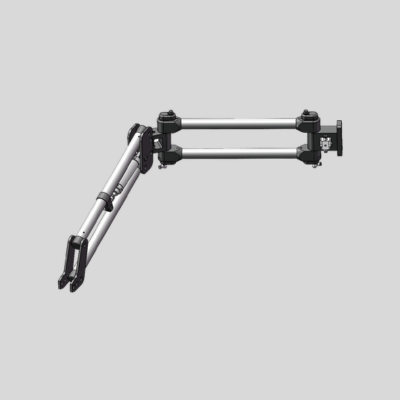
Is KR008 Right for Your Workstation?
Consider the KURAN KR008 when installation space is limited and your tightening tool needs compact, folding support. Start with the available mounting position, then check whether the arm can reach every fastening point without interfering with surrounding equipment.
Limited Overhead Clearance
Frames, enclosures or nearby equipment may restrict the space above your workstation. KR008 offers a compact folding structure that can be evaluated for layouts where a taller support arrangement would be difficult to install.
Check available height and the full vertical movement path.
Side-Mounted Installation
If your workstation layout favors a side mounting position, KR008 can provide tool support from that location. Select the mounting side and folding direction around operator access, fixture placement and the required tightening positions.
Confirm mounting strength, location and folding direction.
Multiple Fastening Points in a Compact Area
When several fastening points sit within a restricted work area, the folding arm helps you reposition the tool between them. Match the arm lengths and vertical stroke to your fastening layout, including the nearest and farthest points.
Verify point coverage and clearance around fixtures.
See KR008 in Action
Explore the KURAN KR008 videos and consider how its installation and movement could fit your tightening workstation. Select a video below to watch.
KR008 Video 1
Use these videos alongside the dimensions and specifications to assess your workstation requirements.
- Mounting Clearance
- Check the available space above and beside your workstation.
- Tool Movement
- Consider folding direction, vertical travel and clearance around fixtures.
- Fastening Point Coverage
- Confirm that your selected arm configuration can reach every required tightening point.
Mounting Options and Folding Direction
Match your KURAN KR008 installation to the available mounting structure, working height and fastening layout. Select the folding direction together with the mounting position to maintain clearance throughout the tool’s movement.
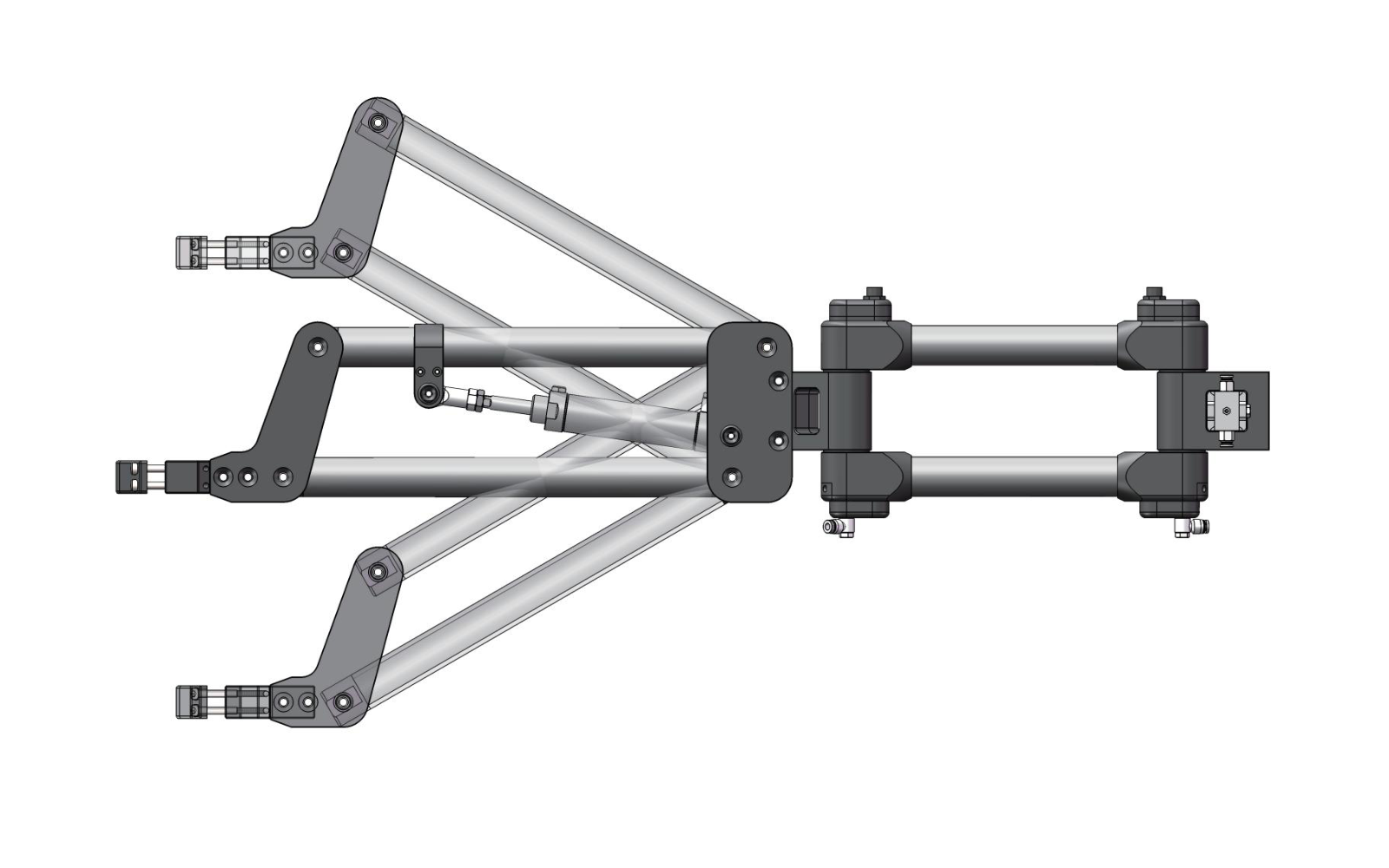
Side-Mounted Installation
Mount the arm from a suitable side support when the workstation layout favors lateral installation. The folding structure and vertical movement should be checked against the fixture, tool approach and nearby equipment.
Confirm before selection: mounting surface strength, installation height and clearance across the full movement range.
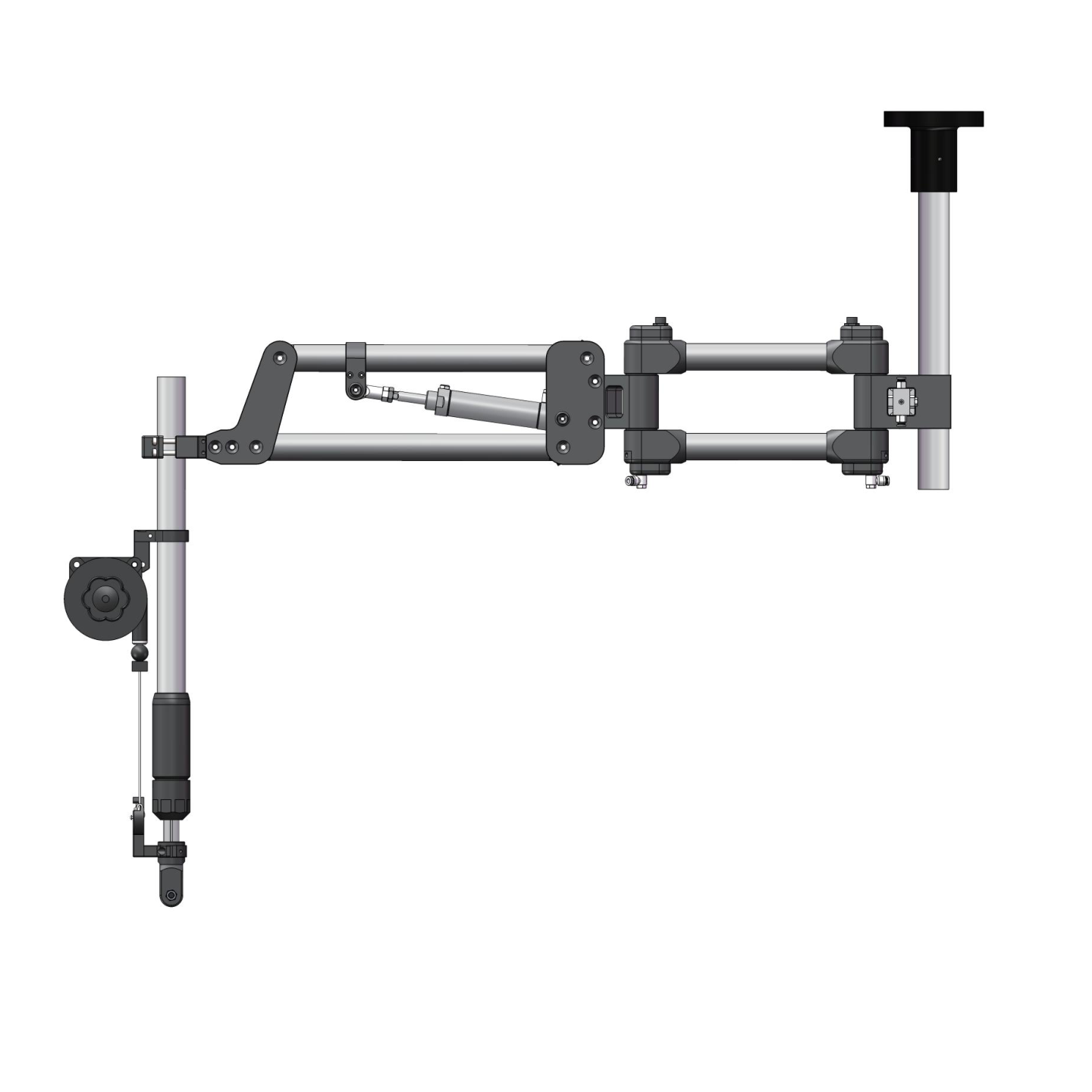
Top-Mounted Installation
A top-mounted configuration can be evaluated when a suitable overhead support is available. Match the mounting height and extension components to the tool’s required working position and vertical travel.
Confirm before selection: overhead support strength, mounting height, extension length and fastening point coverage.
Column / Bench Mounting
KR008 also supports column-based configurations. If you prefer a bench-mounted support, share your workstation dimensions so KURAN can review the column height, mounting components and structural requirements.
Left Fold or Right Fold?
KR008 is available in left-fold and right-fold configurations. Use the KURAN reference diagram to identify the required direction, then check the arm’s movement against your workstation layout.
Include the operator position, mounting location and fastening points in your layout drawing. This helps confirm the folding direction and check for interference with fixtures or surrounding equipment.
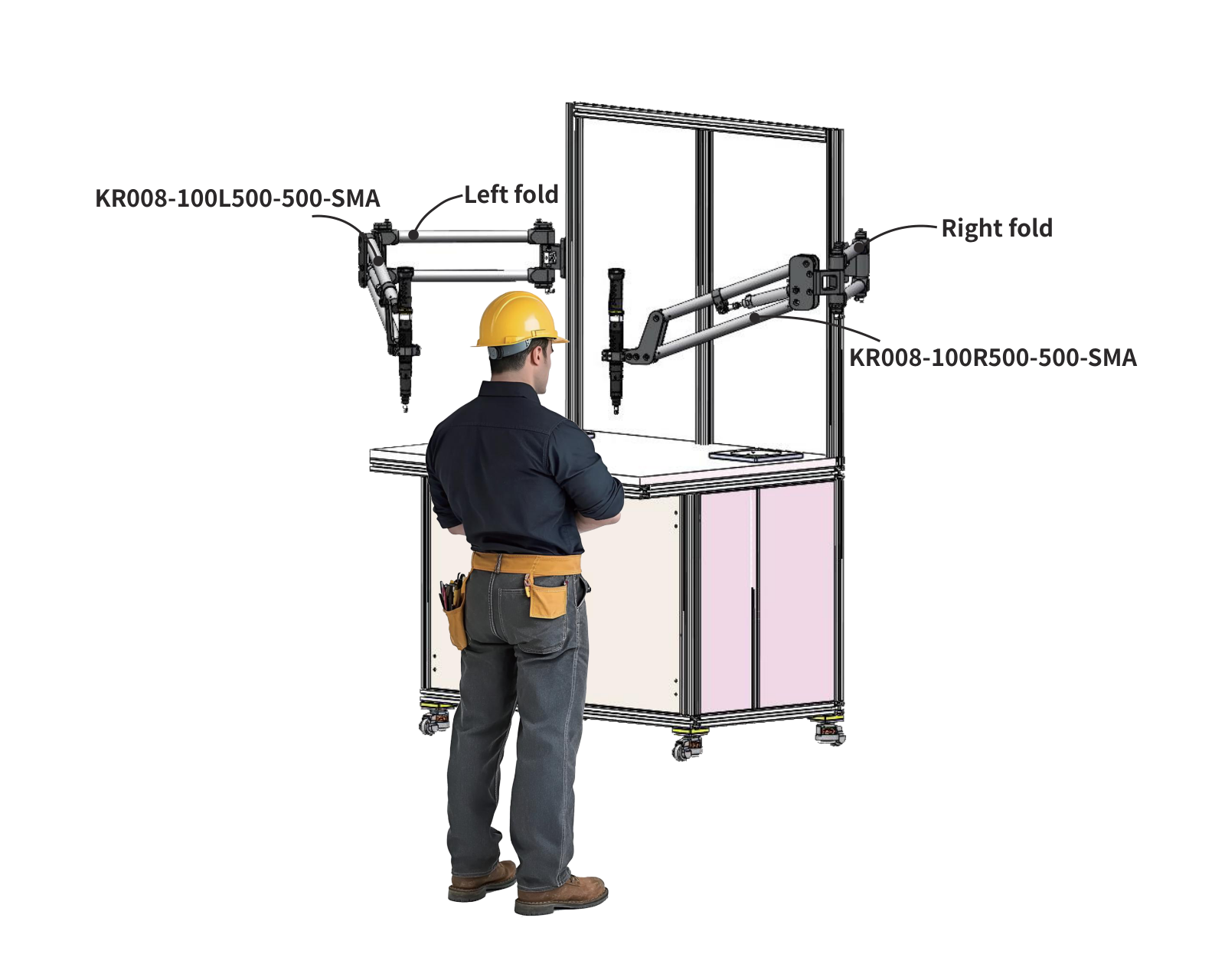
View Larger Diagram
Lightweight Movement and Adjustable Tool Support
The KURAN KR008 combines a carbon fiber arm structure, pneumatic tool balancing and adjustable damping to support repetitive tightening tasks. Each feature addresses a different part of tool handling: moving the arm, supporting the load and managing rotational movement.
Carbon Fiber Structure
The carbon fiber arm combines low structural weight with resistance to reaction torque. For tasks that require frequent repositioning, the lightweight structure helps reduce the effort involved in moving the arm between fastening points.
Easier repositioning during repetitive assembly.
Pneumatic Tool Balancing
A balancing cylinder and precision pressure regulator allow the support force to be adjusted for the tool load. When correctly configured, the system helps reduce the effort needed to raise, lower and guide the tightening tool.
Adjustable weight support for smoother vertical handling.
Adjustable Damping
Adjustable damping lets you tune rotational resistance to suit the operating task. It helps balance smooth movement with stable positioning, reducing unwanted swinging while the operator guides or parks the tool.
Controlled rotation with more stable tool positioning.
Choose Your KR008 Configuration
Start with the mechanical layout, then select the position detection and signal options your process requires. KURAN can help match the configuration to your tool, fastening points and available installation space.
Define Your Mechanical Configuration
Arm Lengths and Vertical Travel
Select the horizontal and folding arm lengths around the nearest and farthest fastening points. Check the required vertical travel and clearance throughout the movement path.
Compare standard dimensions in the specifications below.
Mounting Method
Choose a mounting arrangement that suits your workstation structure and working height. Confirm the mounting components and support rigidity for the selected layout.
S: Side-mounted · H: Column · T: Top-mounted
Left Fold or Right Fold
Use the reference diagram above to identify the required folding direction. Consider the operator position, fixture arrangement and potential interference with nearby equipment.
L: Left fold · R: Right fold
Select Your Position Detection Option
No Position Detection
A sensor-free configuration provides mechanical reaction torque support and tool balancing without position feedback from the arm.
XY Position Detection
An XY configuration provides horizontal position feedback. With a compatible control system, this information can support verification of the intended fastening position.
XYZ Position Detection
An XYZ configuration adds vertical position feedback to XY detection. A compatible control system can use this information when fastening location verification also depends on tool height.
Sensor Signal Options
0–10 V Analog Output
RS485 Digital Communication
Signal options apply to sensor-equipped configurations. Select the interface to match the receiving controller. Position verification, sequence control and tool enable logic require a compatible controller, tool interface and configured workstation program.
KR008 Technical Specifications
Compare the standard KR008 arm-length combinations with their corresponding maximum working radius and vertical stroke. Use these dimensions alongside your tool load, mounting position and fastening layout to identify a suitable configuration.
Standard Arm-Length Combinations
Swipe horizontally to view all columns.
| Horizontal Arm Length mm | Folding Arm Length mm | Maximum Working Radius mm | Vertical Stroke mm |
|---|---|---|---|
| 200 | 300 | 700 | 180 |
| 300 | 300 | 800 | 180 |
| 300 | 400 | 900 | 300 |
| 400 | 400 | 1000 | 300 |
| 400 | 500 | 1100 | 300 |
| 500 | 500 | 1200 | 400 |
Working coverage: Maximum working radius and vertical stroke depend on the selected arm-length combination. Confirm access to both the nearest and farthest fastening points, including fixture clearance.
Tool load: Provide the weight of the tool, adapter, socket and attached accessories so KURAN can confirm the supported load and balancing requirements.
Dimensions and Model Code Guide
Review the KR008 working-range diagram and mounting interfaces, then use the model code guide to identify the arm dimensions, folding direction, installation method and sensor configuration.
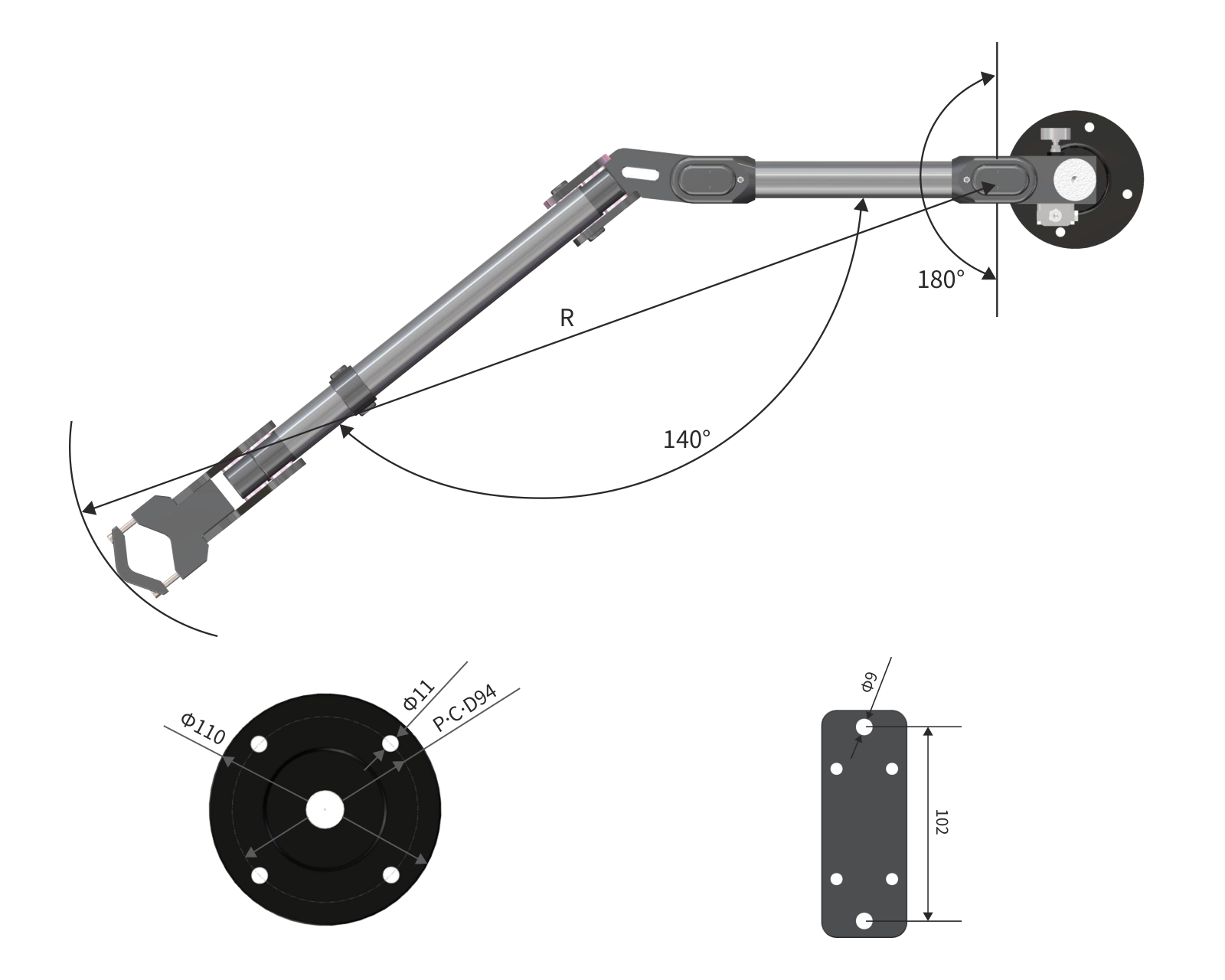
View Larger Drawing
Check Working Coverage and Mounting Fit
Use the reference drawing together with the specification table to evaluate your installation. Confirm the selected arm dimensions and mounting interface against your workstation layout.
- Working Radius · R
- R identifies the working radius in the diagram. Refer to the selected arm-length combination for its published maximum radius.
- Joint Movement
- The reference drawing shows 140° and 180° movement annotations. Check the usable movement path against fixtures, guards and nearby equipment.
- Mounting Interfaces
- Review the flange diameter, bolt-hole pattern and mounting-plate dimensions shown. Confirm which interface applies to your installation.
How to Read a KR008 Model Code
The example below identifies a 100 Nm, left-fold, side-mounted configuration with a 400 mm horizontal arm, a 500 mm folding arm and XY position detection with analog output.
KR008-100L400-500-SMA- KR008
- Product Series KR008 side-mounted carbon fiber torque reaction arm.
- 100
- Maximum Torque Maximum reaction torque rating: 100 Nm.
- L
-
Folding Direction
L: Left fold.
R: Right fold. - 400
- Horizontal Arm Horizontal arm length in this example: 400 mm.
- 500
- Folding Arm Folding arm length in this example: 500 mm.
- S
-
Mounting Method
S: Side-mounted.
H: Column.
T: Top-mounted. - M
-
Position Detection
N: No sensor.
M: XY detection.
MZ: XYZ detection. - A
-
Sensor Signal
A: 0–10 V analog output.
S: RS485 digital communication.
Code position matters: S in the mounting-method position means side-mounted; S in the sensor-signal position means RS485 communication. The signal suffix applies to sensor-equipped configurations.
Tool Compatibility and System Integration
Match your KR008 to the tightening tool and the level of process control your workstation requires. Tool mounting, sensor feedback and optional accessories can be reviewed together to define a suitable KURAN configuration.
Tool Mounting Compatibility
Select a suitable adapter around your tool’s clamping location, dimensions and tightening direction. Compatibility is confirmed for the specific tool model and installation.
- Provide the tool brand, model and clamping dimensions.
- Include the weight of the tool, socket, adapter and accessories.
- Confirm maximum configured torque and required tool orientation.
Position Detection and Controller Integration
Sensor-equipped KR008 configurations can provide XY or XYZ position feedback. A compatible controller and tool interface can use this feedback for position verification and tightening sequence management.
- KR002-B01: workstation point and program management.
- KR002-H01: supervisory functions and tightening record integration.
- Confirm the sensor signal, tool interface and required process logic.
Optional Workstation Accessories
Add socket selection and visual status feedback when your assembly process needs them. Choose accessories around the tool programs, product variants and workstation control logic.
- KR004 Smart Socket Selector: supports socket selection and program matching.
- KR004-3SD Tower Light: provides visible workstation status feedback.
- Confirm wiring and signal compatibility with the control system.
Confirm Your Tool and Control Requirements Share your tool specifications, workstation layout and required process functions. KURAN can review the mounting arrangement and control interfaces; position verification and sequence functions depend on the selected sensors, controller and system setup.
Check My Tool CompatibilityKR008 Frequently Asked Questions
Find answers about KR008 mounting options, folding direction, pneumatic balancing, position detection, and the information needed to select a suitable configuration.
KR008 is designed for workstations with restricted installation space where compact folding tool support is needed. Side-mounted, column-based and top-mounted configurations can be evaluated around your layout. Confirm the mounting position, working coverage, tool load and clearance around fixtures before selection.
Use the KURAN folding-direction reference diagram to identify L for left fold and R for right fold. Select the direction together with the mounting location, operator position and fastening layout. A workstation drawing helps KURAN check whether the arm’s movement will interfere with fixtures or nearby equipment.
Yes. The pneumatic balancing system uses a balancing cylinder and precision pressure regulator to support the tool load, so a suitable compressed-air supply is required. Confirm the operating pressure and connection requirements for your selected configuration with KURAN before installation.
Include the tightening tool, adapter, socket or bit extension, and attached accessories. The published maximum effective payload is 7 kg. Provide the complete load information and tool orientation so KURAN can confirm the mounting arrangement and pneumatic balancing requirements.
Choose N when arm-based position feedback is unnecessary. Consider M for XY detection when fastening points can be distinguished by horizontal location. Choose MZ for XYZ detection when vertical position must also be verified.
Position verification and tightening sequence functions require a compatible controller, tool interface and configured workstation program.
KR008 can be considered for an existing workstation after reviewing the mounting structure, installation space, compressed-air supply and fastening layout. The support must be suitable for the tool load and reaction torque. Share workstation photographs or drawings so KURAN can assess the required mounting components and any structural changes.
Provide the tool brand and model, maximum configured torque, total supported load, fastening-point locations, required vertical travel and available mounting space. Include your preferred mounting method and any position verification or sequence-control needs. Workstation photographs or a dimensioned layout will help the review.
Send your requirements to KURAN for a configuration recommendation.
Configure KR008 for Your Workstation
Share your maximum tightening torque, tool model and total supported weight, fastening-point layout, and available mounting space. KURAN will help recommend suitable arm dimensions, mounting components, folding direction, and position-detection options. If some details are unknown, send the information you have.