
KR011 Low-Torque Pneumatic Reaction Arm
The KURAN KR011 is a compact reaction arm for fastening applications up to 10 Nm. Nitrogen spring cylinders assist tool handling, while top, side and column mounting options help fit different workstation layouts. Optional XY position detection is available for applications that require tool position monitoring.
- Maximum Reaction Torque
- 10 Nm
- Working Radius
- 610 mm
- Vertical Travel
- 300 mm
- Position Detection
- Optional XY
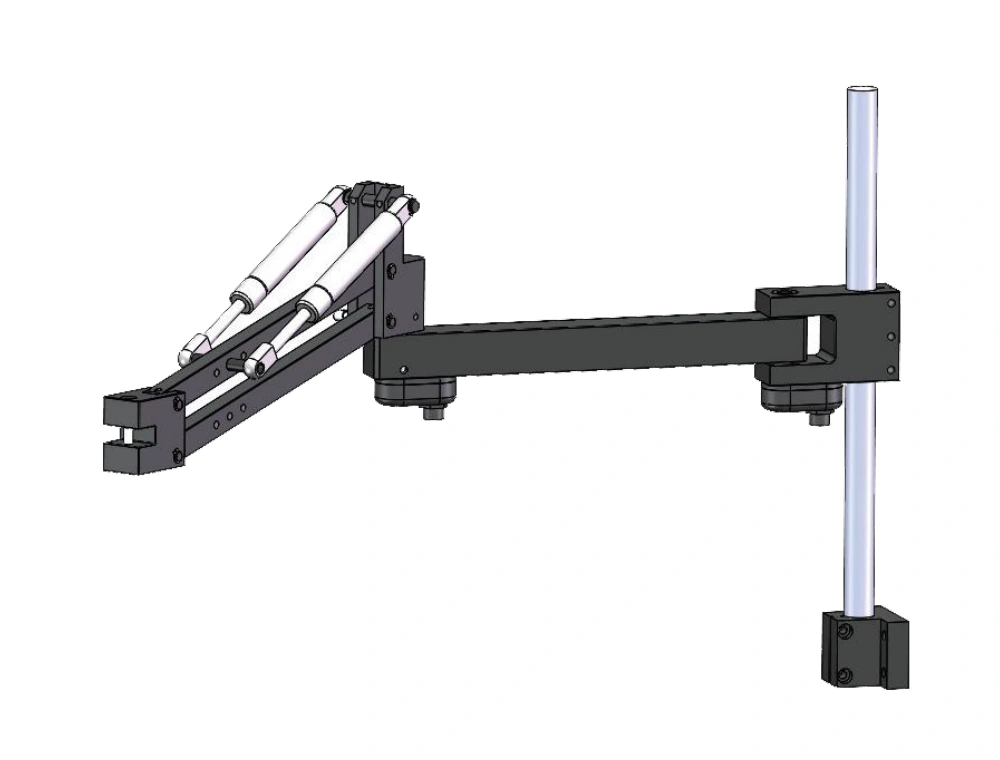
Is the KR011 Right for Your Workstation?
Before choosing a configuration, check your tool’s reaction torque, fastening positions and available mounting space. The KR011 is designed for compact, low-torque fastening workstations.
Low-Torque Fastening
Suitable for fastening applications with reaction torque up to 10 Nm. Confirm the tool’s maximum reaction torque before selection.
Reach That Fits Your Fastening Points
The listed models provide a 610 mm working radius and 300 mm vertical travel. Check all fastening points against the usable working envelope.
Mounting That Fits Your Layout
Choose top, side or column mounting according to your workstation layout and available support structure.
Position Detection When Required
Optional XY position detection is available when your application requires tool position monitoring.
Compact Arm Design and Spring-Assisted Support
The KR011 combines an articulated arm, a horizontal arm and nitrogen spring cylinders in a compact assembly. The component layout below shows the column-mounted configuration, including the tool-side clamping block and optional angle sensors.
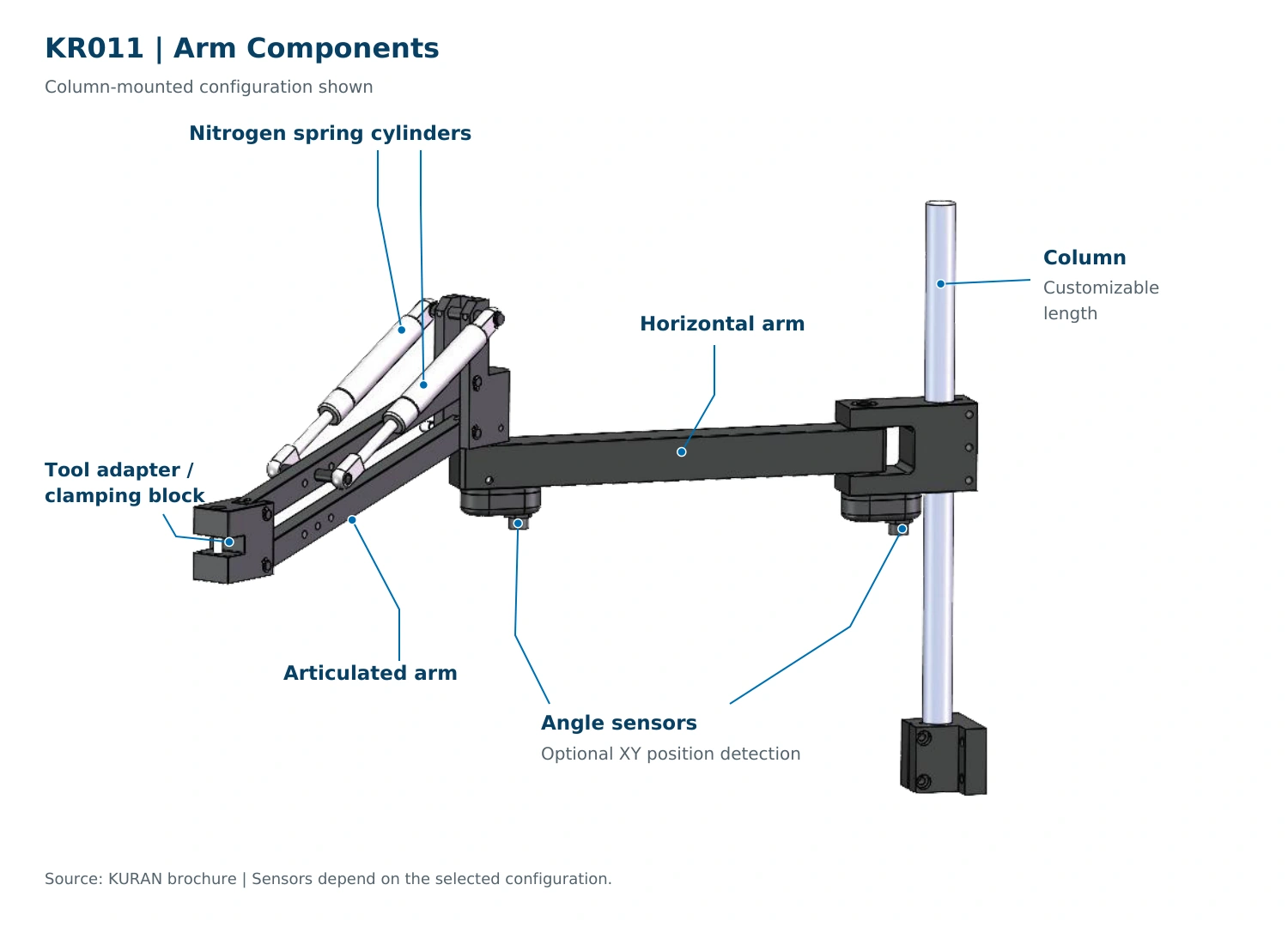
Nitrogen Spring Assistance
Nitrogen spring cylinders assist tool handling as the articulated arm moves vertically.
Articulated and Horizontal Arms
The articulated section provides vertical movement, while the horizontal arm connects it to the mounting assembly.
Tool-Side Clamping Interface
The tool-side adapter and clamping block connect the fastening tool to the arm. Compatibility should be checked against the tool’s clamping dimensions.
Customizable Column Length
For column-mounted configurations, the column length can be customized to suit the workstation layout.
Choose Your KR011 Configuration
Configure the KR011 around your workstation layout and position monitoring requirements. Choose the sensor option, mounting method and column length that suit your application.
01 SENSOR OPTIONS
N — Without Position Detection
Choose the N configuration when tool position monitoring is not required. No position sensors are included.
M — With XY Position Detection
Choose the M configuration when XY tool position monitoring is required. Angle sensors provide position feedback for integration with a compatible control system.
02 MOUNTING OPTIONS
Top Mounting
Mount the arm to a suitable overhead support structure. Confirm mounting height and clearance against the fastening positions.
Side Mounting
Mount the arm to a suitable side support. Check the working envelope and clearance around the fixture.
Column Mounting
Use a column-mounted arrangement where the workstation can accommodate a mounting column.
Customizable Column Length
For column-mounted configurations, the column length can be customized. Provide the required tool working height and workstation dimensions for confirmation.
Technical Specifications
The listed KR011 models share the same torque capacity, working radius and vertical travel. Choose the configuration according to your position detection requirements and workstation layout.
Swipe horizontally to view all specifications.
| Product Model | Maximum Reaction Torque Nm | Working Radius mm | Vertical Travel mm |
|---|---|---|---|
| KR011-010NR610Z300 | 10 | 610 | 300 |
| KR011-010MR610Z300 | 10 | 610 | 300 |
Selection Note
Check the fastening positions, tool dimensions and mounting conditions before confirming your configuration. Working envelope and mounting details are shown in the drawings below.
Working Envelope and Installation Dimensions
Review the working envelope and mounting details before planning your workstation. The drawings show the column-mounted reference layout, horizontal movement and mounting hole pattern.
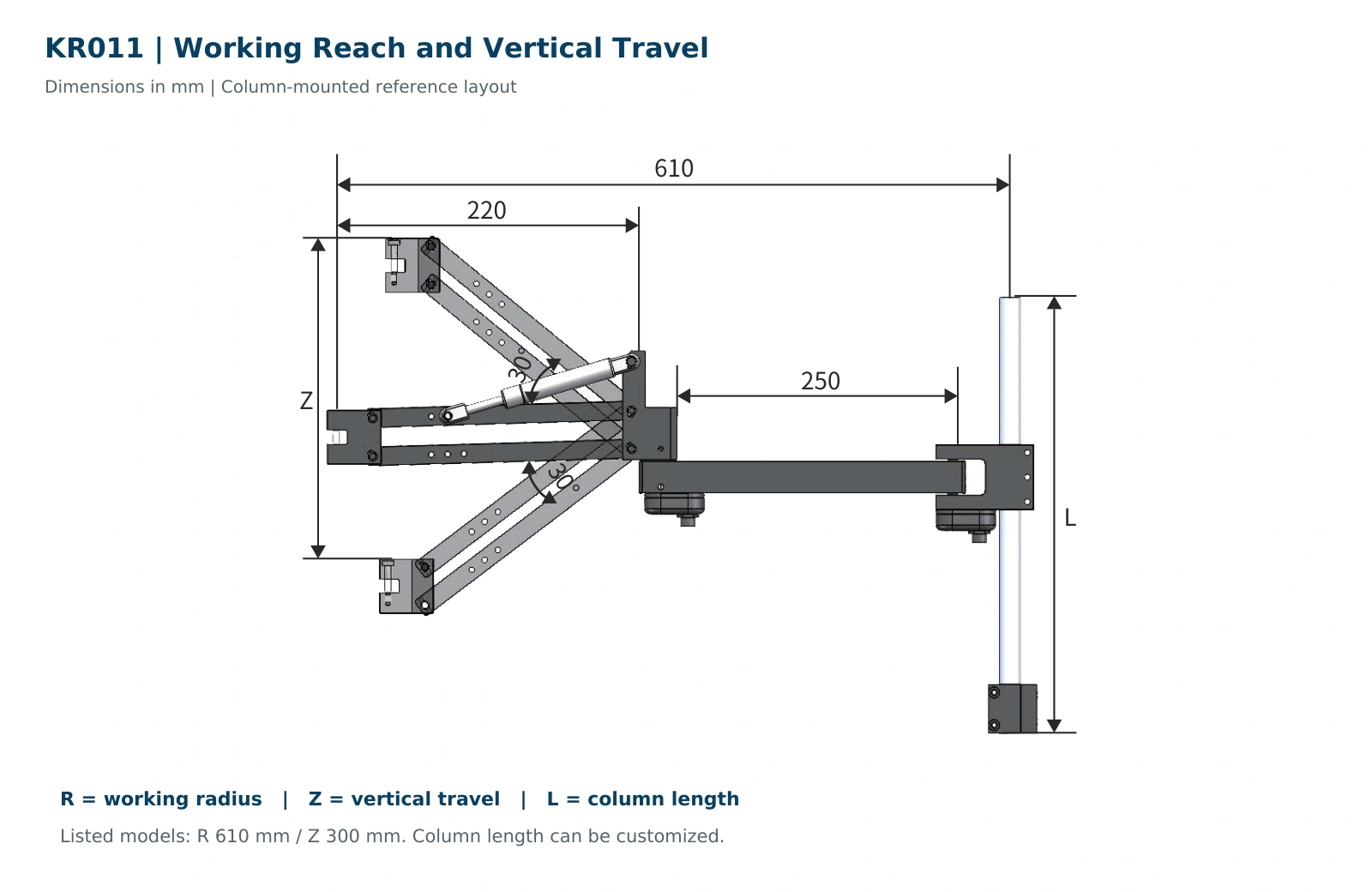
Working Reach and Vertical Travel
The listed models provide a 610 mm working radius and 300 mm vertical travel. Column length can be customized.
- R
- Working radius
- Z
- Vertical travel
- L
- Column length
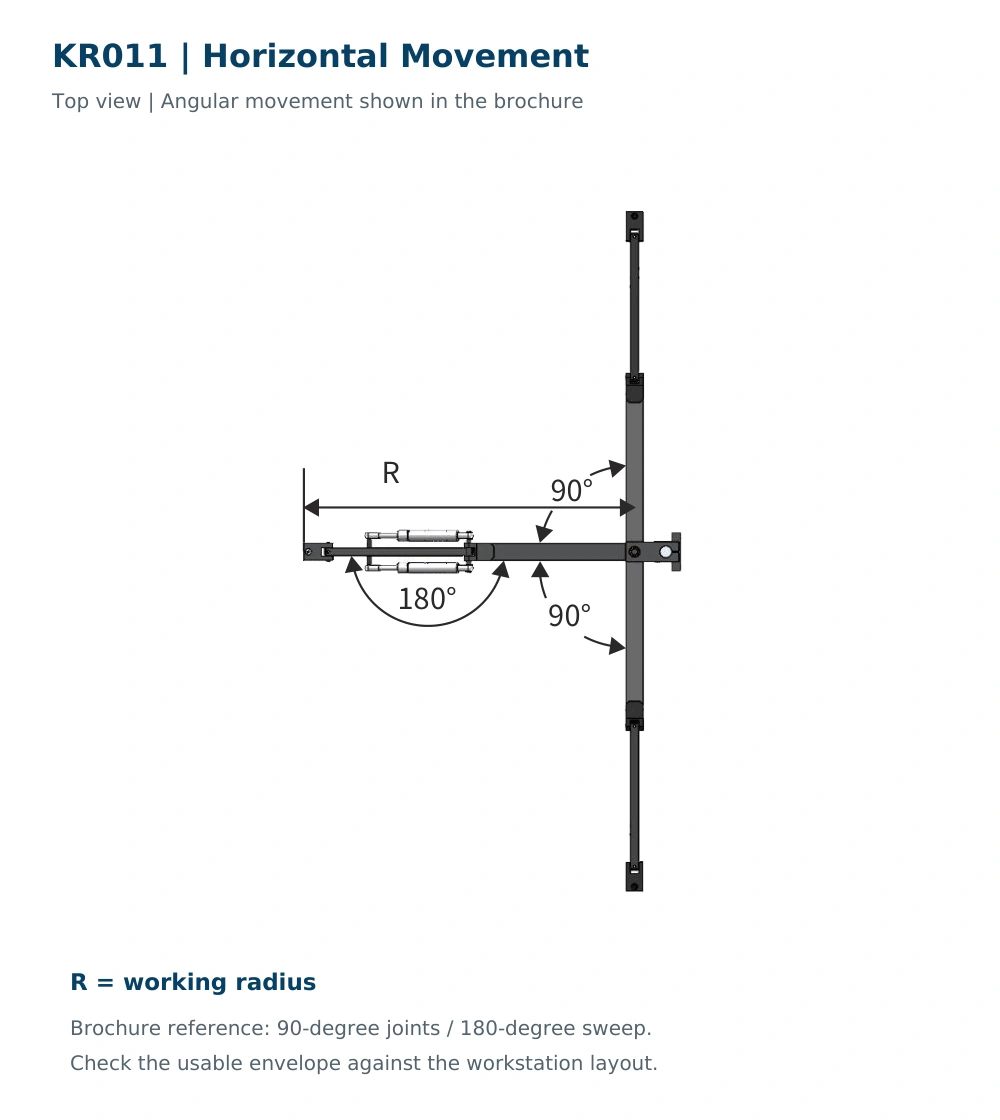
Horizontal Movement
Check the illustrated movement range against your fastening positions and surrounding fixtures.
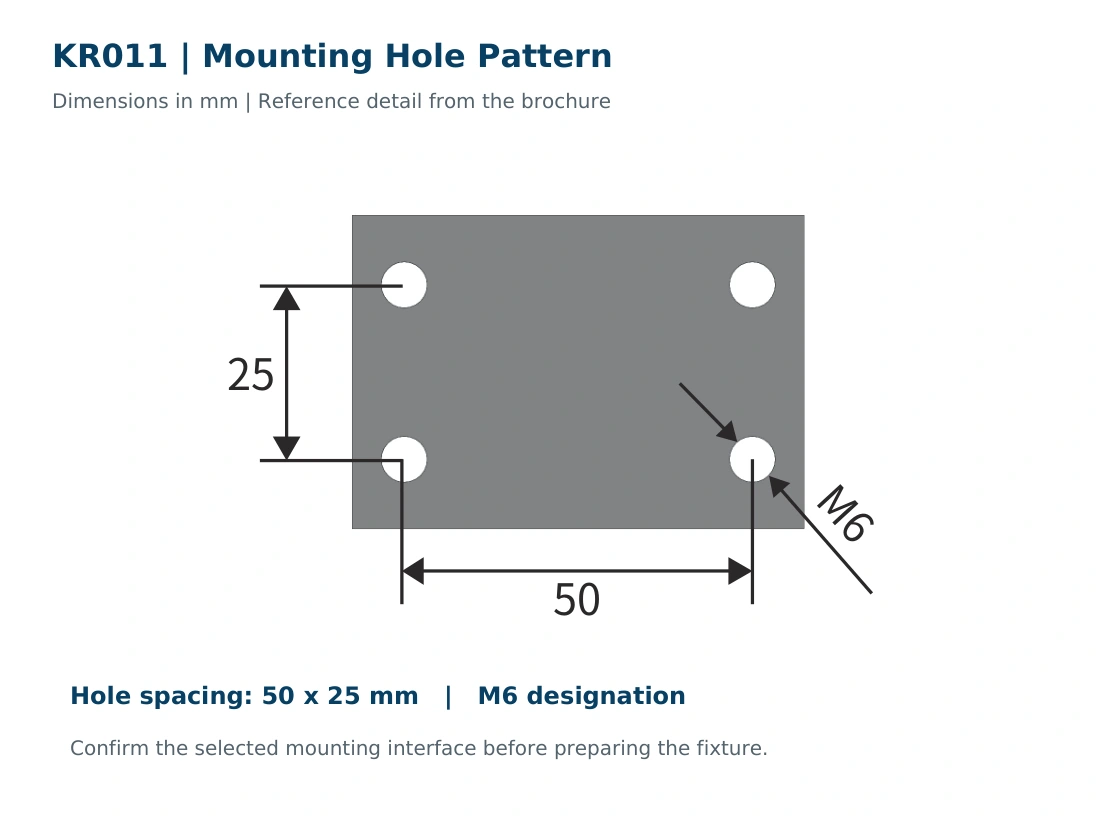
Mounting Hole Pattern
Reference hole spacing is 50 × 25 mm with an M6 designation. Confirm the interface for your selected configuration.
Optional XY Position Detection
Optional angle sensors provide XY tool position monitoring for the KR011. For applications that require position feedback, confirm the sensor configuration and compatible control system during selection.
XY Position Monitoring
Monitor the tool’s position within the arm’s horizontal working envelope using the position-detection configuration.
Control System Integration
Confirm the controller, sensor connections and required monitoring functions before integrating position feedback into your workstation.
Application-Based Configuration
Provide the fastening-point layout and position monitoring requirements so KURAN can confirm the appropriate configuration.
Position Feedback Scope
The optional sensors provide arm position feedback. Tightening torque and tightening angle data depend on the fastening tool and its control system.
Tool Compatibility and Selection Checklist
Select the KR011 around your fastening tool and workstation layout. Share the following details so KURAN can review the tool interface, working envelope and mounting configuration.
-
01
Tool Make and Model
Provide the tool manufacturer, model and datasheet, if available.
-
02
Maximum Reaction Torque
Specify the maximum reaction torque for the application. The KR011 has a listed capacity of 10 Nm.
-
03
Tool Weight and Accessories
Include the tool’s weight and any attached sockets, extensions or accessories.
-
04
Clamping Dimensions
Share the intended clamping location, its dimensions and a clear photo or drawing.
-
05
Fastening Layout and Posture
Provide fastening-point locations, working heights and the required tool orientation.
-
06
Mounting and Position Monitoring
Indicate the preferred mounting method, available space and whether XY position monitoring is required.
A tool datasheet and a simple workstation sketch help KURAN review your requirements.
Frequently Asked Questions
Find answers to common questions about KR011 torque capacity, working reach, mounting options, tool compatibility and optional XY position detection.
What is the maximum reaction torque of the KR011?
The KURAN brochure lists a maximum reaction torque capacity of 10 Nm for the KR011. Confirm the maximum reaction torque of your fastening application before selecting the arm.
What working radius and vertical travel are available?
The listed models, KR011-010NR610Z300 and KR011-010MR610Z300, provide a 610 mm working radius and 300 mm vertical travel. Review the working envelope drawings to check whether all fastening points can be reached without interference from the workpiece or fixture.
How can the KR011 be mounted?
The KR011 supports top, side and column mounting. Choose the mounting method according to the available support structure, fastening positions and clearance around the workstation. Confirm the mounting interface for your selected configuration before preparing the fixture.
Can the column length be customized?
Yes. The column length can be customized for column-mounted configurations. Provide the required tool working height, workstation dimensions and installation requirements so KURAN can confirm the appropriate column length.
Is XY position detection available?
Yes. Optional angle sensors are available for XY tool position monitoring. During selection, confirm the sensor configuration, compatible controller and required monitoring functions for your workstation.
Does position detection provide tightening torque or angle data?
The optional sensors provide arm position feedback. Tightening torque and tightening angle data depend on the fastening tool and its control system. Confirm these data requirements when selecting the complete workstation configuration.
How do I confirm compatibility with my fastening tool?
Provide the tool manufacturer, model, weight and maximum reaction torque, together with the intended clamping location and dimensions. A clear tool photo or drawing helps KURAN review the clamping interface and required fastening orientation.
What information should I provide for a quotation?
Share the tool datasheet, fastening-point layout, working heights, available mounting space and position detection requirements. Include any sockets or extensions fitted to the tool. A simple workstation sketch helps KURAN review your requirements and prepare a suitable configuration.
Configure Your KR011 Workstation
Share your tool model, maximum tightening torque, tool weight and fastening-point layout. Include the required working height, preferred mounting method and any XY position detection requirements. KURAN will review the tool interface and workstation configuration. Send the details you have to get started.