
Poka-Yoke Error-Proofing Devices for Industrial Tightening Workstations
KURAN poka-yoke devices help industrial tightening workstations prevent incorrect tool, socket, bit, and program selection while providing clear process-status feedback. The KR004 series combines smart selection, program switching, locking control, and visual indication to guide operators through the correct assembly process and reduce missed, repeated, or incorrect tightening operations.
Choose the Right Poka-Yoke Device for Your Tightening Workstation
KURAN offers four KR004 poka-yoke devices for different error-proofing tasks within a tightening workstation. The KR004 Smart Selector verifies the required tool or bit, the KR004-CX selects the correct tightening program, the KR004-SJ locks the required bit against incorrect use, and the KR004-3SD provides clear visual status feedback. Select the appropriate device according to the specific operator error or process risk you need to prevent.
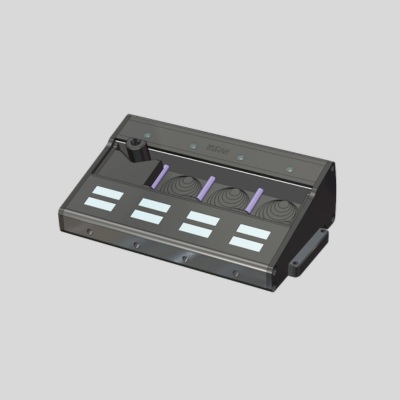
Automatically identifies the selected socket or bit and activates the corresponding tightening program, helping prevent incorrect tool selection, torque-setting errors, and out-of-sequence operations.
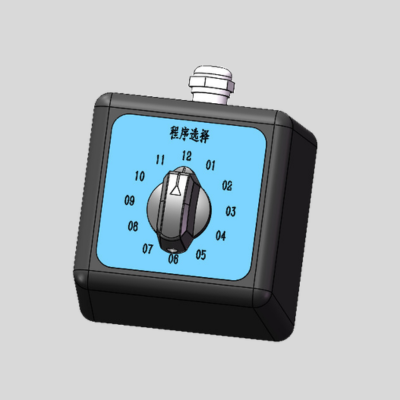
Allows operators to manually select and switch between tightening programs, providing a simple and reliable way to apply the correct torque settings for different assembly tasks.
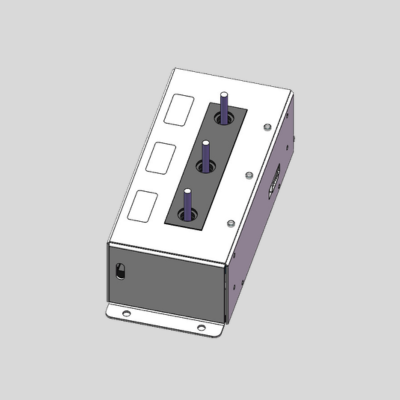
Uses a locking mechanism to secure the selected bit and support stable program matching, helping prevent incorrect bit use, misalignment, and fastening errors.

Provides clear three-color visual feedback for operating status, warnings, and errors, helping operators understand workstation conditions and respond quickly during tightening operations.
Compare KURAN KR004 Poka-Yoke Devices
Each KR004 device addresses a different source of assembly error. Compare their main functions, the process risks they address, and their typical workstation uses before selecting a standalone device or combined poka-yoke configuration.
| Model | Main Function | Risk Addressed | Recommended Use |
|---|---|---|---|
| KR004 Smart Socket Selector | Main Function Automatically identifies the selected socket or bit and activates the corresponding tightening program. | Risk Addressed Incorrect socket or bit selection and use of the wrong torque program. | Recommended Use Multi-product or multi-torque stations that require automatic selection verification. |
| KR004-CX Program Selector | Main Function Allows operators to manually select and switch between predefined tightening programs. | Risk Addressed Incorrect program or torque-setting selection when task requirements change. | Recommended Use Straightforward workstations where operators must choose among several tightening programs. |
| KR004-SJ Locking Bit Selector | Main Function Locks the selected bit securely and supports stable identification and program matching. | Risk Addressed Incorrect, loose, or misaligned bit selection during tightening. | Recommended Use Applications requiring controlled bit access and reliable selection in critical fastening tasks. |
| KR004-3SD Three-Color Tower Light | Main Function Displays real-time workstation status, warnings, and errors with three-color visual signals. | Risk Addressed Unclear process status and delayed response to abnormal conditions. | Recommended Use Busy, noisy, or multi-station production areas requiring at-a-glance visual feedback. |
Selection tip: The KR004 Smart Socket Selector, KR004-CX, and KR004-SJ manage tool, bit, or program selection. The KR004-3SD provides visual status feedback and can be combined with a selector or tightening control system.
How KURAN Poka-Yoke Error-Proofing Works
A poka-yoke workstation prevents errors before tightening begins by connecting socket, bit, and program selection with clear operator guidance. The exact sequence depends on the selected KR004 devices, but a typical error-proof tightening process follows the steps below.
- 01 Job setup
Load the Job Requirements
The tightening controller or workstation control system loads the product, tightening sequence, approved socket or bit, and corresponding program.
- 02 Operator guidance
Guide the Correct Selection
The configured KR004 device indicates, releases, or allows the operator to choose the required socket, bit, or tightening program.
- 03 Selection check
Verify the Selection
The selection signal is checked before tightening. A mismatch prompts correction and, when configured, prevents the process from advancing.
- 04 Tightening
Perform the Tightening Step
The operator completes the fastening operation using the verified accessory and the correct torque program for the current fastening point.
- 05 Status feedback
Display the Result and Continue
The tightening system evaluates the result, while the KR004-3SD can show operating, warning, or error status before the next step begins.
Process result: Each fastening step begins with a verified selection and clear guidance, reducing reliance on operator memory and helping prevent wrong-tool, wrong-program, and sequence errors.
Typical Applications for Poka-Yoke Devices in Tightening Workstations
KURAN KR004 devices are useful wherever operators must choose among multiple sockets, bits, products, or tightening programs. They can be used individually or integrated with a tightening control system to reduce selection errors and make workstation status clearer in the following application scenarios.
Multi-Product Assembly Lines
Different products require different sockets, bits, torque values, or tightening sequences at the same workstation.
Multiple Tightening Programs
Operators regularly switch among predefined torque programs for fasteners with different specifications or process requirements.
Shared Socket and Bit Sets
Several accessories are stored at one station, increasing the risk of selecting the wrong socket or bit for the fastening task.
Controlled Bit Selection
Critical fastening tasks require the selected bit to remain correctly positioned and reliably identified throughout the operation.
Frequent Product Changeovers
Short production runs and frequent model changes increase dependence on operator memory and correct process selection.
Busy or Noisy Work Areas
Operators need clear, at-a-glance confirmation of operating, warning, or error states during the tightening process.
What Information Should You Prepare Before Selecting a Poka-Yoke Device?
To recommend the right KR004 device or combination, KURAN needs to understand the specific error you want to prevent and how the existing tightening workstation operates. Prepare the following information before requesting a poka-yoke configuration recommendation.
Error to Prevent
- Wrong socket or bit selection
- Incorrect tightening program or torque setting
- Missed, repeated, or out-of-sequence fastening
Tool and Controller
- Tightening tool brand and model
- Existing controller or PLC type
- Available digital I/O or communication interface
Socket and Bit Requirements
- Number and type of sockets or bits
- Accessory dimensions and storage layout
- Need for locking or automatic identification
Products and Programs
- Number of product variants
- Number of tightening programs
- Torque or angle requirements for each task
Workstation Sequence
- Number and order of fastening points
- How operators currently receive step guidance
- Required action after a wrong selection or NOK result
Status and Integration
- Required visual indicators and status meanings
- Connection to a tightening controller, PLC, or MES
- Need for result records or process traceability
Useful supporting files: Workstation photos, layout drawings, a socket or bit list, tightening tool information, and a simple description of the current operating sequence will help KURAN recommend a suitable configuration.
Frequently Asked Questions About Poka-Yoke Tightening Devices
These answers address common questions about the functions, differences, compatibility, integration, and selection of KURAN KR004 poka-yoke devices for industrial tightening workstations.
01What Is a Poka-Yoke Device in a Tightening Workstation?
A poka-yoke device helps prevent or immediately identify operator errors before or during fastening. In a tightening workstation, it can verify socket, bit, or program selection, guide the correct process, and provide clear status feedback when connected to the control system.
02How Does the KR004 Smart Socket Selector Prevent Selection Errors?
The KR004 Smart Socket Selector identifies the socket or bit selected by the operator and automatically activates the corresponding tightening program. This helps prevent the wrong accessory or torque parameters from being used for the current fastening task.
03What Is the Difference Between the KR004 Smart Socket Selector and KR004-CX?
The KR004 Smart Socket Selector automatically matches the tightening program to the selected socket or bit. The KR004-CX lets the operator manually choose and switch programs. Select the smart selector when automatic verification is required, or the KR004-CX when straightforward manual program selection is sufficient.
04When Should I Choose the KR004-SJ Locking Bit Selector?
Choose the KR004-SJ when a fastening task requires controlled bit selection and stable positioning. Its locking mechanism helps prevent incorrect insertion or misalignment and supports reliable matching between the selected bit and the required tightening program.
05What Does the KR004-3SD Three-Color Tower Light Do?
The KR004-3SD provides visible indication of operating status, warnings, and errors during tightening. It helps operators understand workstation conditions at a glance and respond quickly, but it does not select a socket, bit, or tightening program by itself.
06Can KR004 Devices Work With Existing Tightening Tools and Controllers?
Compatibility depends on the tightening tool, controller, signal type, and required workflow logic. Provide the tool and controller models, available I/O or communication interface, and a process description so KURAN can evaluate the required integration.
07Can Multiple KR004 Poka-Yoke Devices Be Used Together?
Yes. A workstation can combine automatic selection, manual program selection, bit locking, and visual status feedback. The appropriate combination depends on the errors to prevent, the number of accessories and programs, and how the tightening sequence is controlled.
08Does a Poka-Yoke Device Replace Torque Control?
No. A poka-yoke device helps verify the correct tool, accessory, program, or process step, while the tightening tool and controller apply and evaluate torque or angle. Using both addresses selection and process errors as well as tightening-result control.