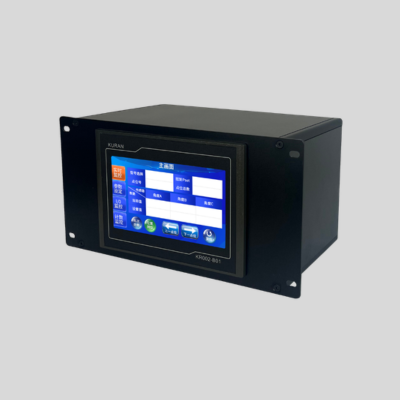
Torque Arm Position Control

KR002-B01 Field Controller for Torque Arm Position Control

Connect the KURAN KR002-B01 to a sensor-equipped torque reaction arm for workstation position control. The 7-inch touchscreen controller supports up to 10 programs with 30 points per program, with RS-485 and 0–10 V arm connections. Choose desktop or panel mounting to fit your workstation.

Touchscreen
7-inch
Programs
Up to 10
Points per Program
30
Mounting
2 Options
KURAN KR002-B01 field controller for torque arm position control
Torque Arm Signal Connections
RS-485 0–10 V Analog

Workstation Fit

Is KR002-B01 Right for Your Workstation?

Check the program capacity, torque arm signals, equipment interfaces and mounting conditions before selecting a KR002-B01 configuration for your tightening workstation.

01

Program and Point Capacity

Compare your requirements with the listed capacity of up to 10 programs and 30 points per program. Include the point requirements for each product or process variant.

Check: Programs required · Points in each program
02

Sensor-Equipped Torque Arm

Confirm the arm’s sensor output and wiring. B01 provides RS-485 and 0–10 V arm connections; the exact signal format and pin assignment should be checked for the selected arm.

Check: Arm model · Sensor output · Wiring details
03

Tool and Workstation Interfaces

Provide your tightening tool and controller model, plus any external-device signal requirements. KURAN can assess the required connections before confirming the configuration.

Check: Tool/controller model · Required I/O signals
04

Mounting and Service Access

Choose desktop or panel mounting to suit your workstation. Check the available space, cable routing, connector clearance and access for operation and maintenance.

Check: Mounting method · Installation space · Cable clearance

Start with the Information You Have

Send your torque arm model, tool/controller details, program and point quantities, and preferred mounting method for an initial configuration review.

Request a Configuration

Program Capacity & Arm Signals

Program Capacity and Position Detection

Start with the number of programs and fastening points your workstation needs. Then confirm the sensor-equipped torque arm and signal connections required for your application.

Count the Programs You Need

KR002-B01 supports up to 10 programs. List the programs required for your products or process variants, then compare that requirement with the controller’s capacity.

Check the Points in Each Program

Each program supports 30 points. Review the required fastening points for each program individually, including any differences between the products handled at the station.

Confirm the Position-Sensing Connections

B01 provides RS-485 and 0–10 V connections for sensor-equipped torque arms. Confirm the arm model, sensor output, signal format and wiring before finalizing the configuration.

RS-485 0–10 V Analog
Prepare These Details for a Configuration Review Torque arm model, sensor output, required program quantity, and the number of fastening points in each program.

Capacity at a Glance

Programs
Up to10
Points per Program
30

Program Capacity

30 Points in Each Program

Program and point capacity illustration. Define the actual programs and fastening-point requirements from your workstation process.
Workstation Connections

Connections and Interfaces

Review the KR002-B01 rear-panel connections when planning your tightening workstation. The controller provides power and USB connections, I/O interfaces for external control devices, and dedicated torque arm connections for RS-485 or 0–10 V signals.
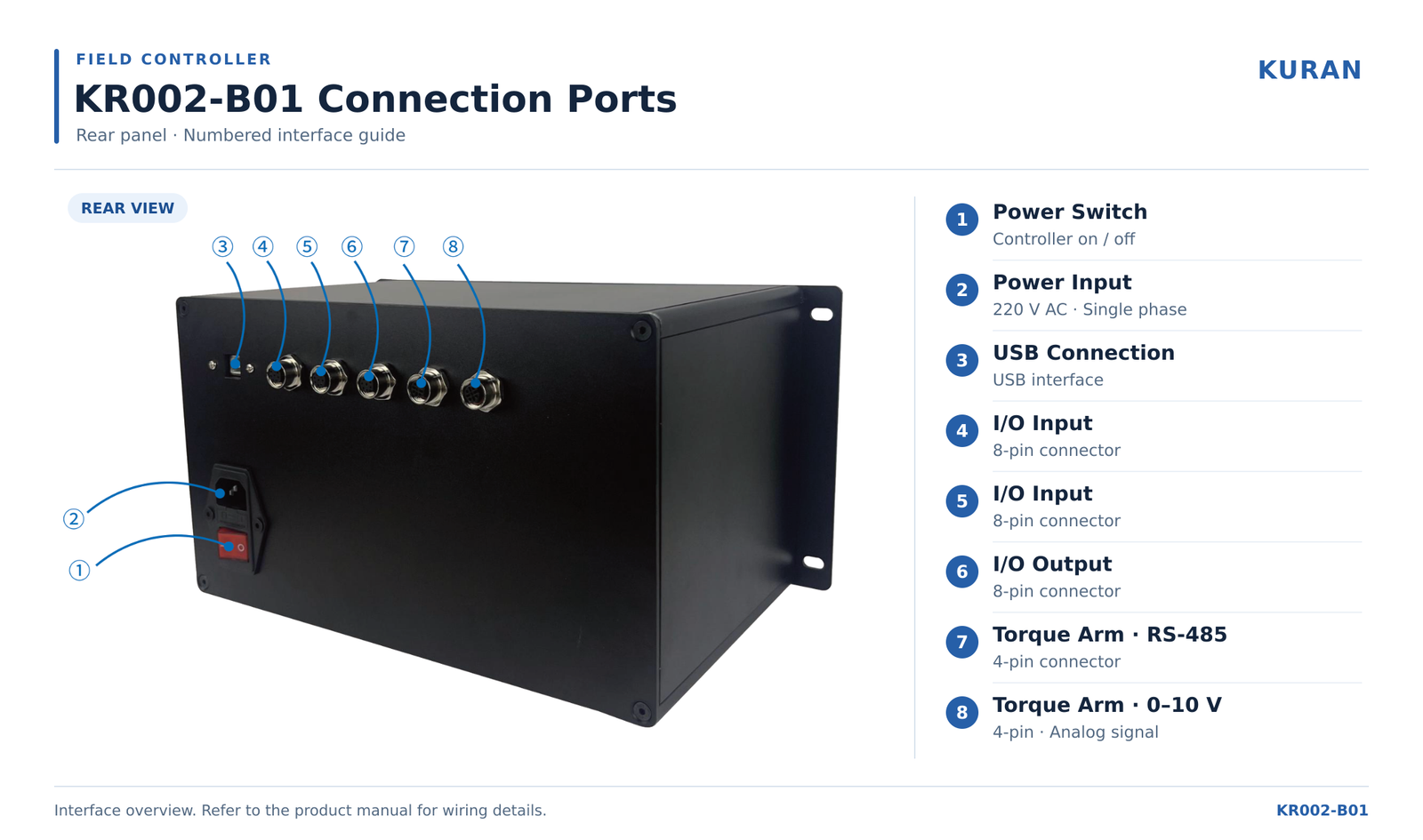
KURAN KR002-B01 field controller rear panel showing power, USB, I/O and torque arm connection ports

The numbered ports correspond to the KR002-B01 product manual. Open the full-size diagram to read the interface labels.

View Full-Size Diagram
Ports 1–3

Power and USB

The rear panel includes the controller power switch, a single-phase 220 V AC power input, and a USB connection. Refer to the product manual for the intended USB connection and installation requirements.

Ports 4–6

External Device I/O

Two 8-pin input connectors and one 8-pin output connector provide interfaces for external control devices. Signal assignments and wiring should be checked against the required workstation logic.

Ports 7–8

Torque Arm Connections

Two 4-pin connectors provide torque arm interfaces: RS-485 and 0–10 V analog. Select the appropriate connection for the sensor interface of the torque arm being used.

Confirm Your Workstation Interfaces

Share your torque arm sensor type, tightening tool or controller model, and available I/O documentation so KURAN can review the connection requirements before confirming a configuration.

Check Compatibility
Specifications and Installation

Technical Specifications and Mounting

Check the controller capacity, torque arm interfaces, and mounting options against your workstation requirements. The KR002-B01 supports desktop or panel installation to suit different operator-station layouts.

KR002-B01 Specifications
ParameterSpecification
ModelKR002-B01 Field Controller
Operator interface7-inch touchscreen
Program capacityUp to 10 programs
Points per programUp to 30 fastening points
Torque arm interfacesRS-485 and 0–10 V analog
Power supplySingle-phase 220 V AC
Mounting optionsDesktop or panel mounting

Two Mounting Options

Desktop Mounting

Place the controller on a suitable workstation surface with the touchscreen visible and within comfortable reach of the operator.

Plan for: available bench space, stable placement, and access to the rear-panel connections.

Panel Mounting

Integrate the controller into a workstation panel to position the touchscreen within the operator interface area and keep the work surface available.

Plan for: the confirmed mounting drawing, rear enclosure clearance, cable routing, and maintenance access.

Planning a panel installation? Confirm the mounting dimensions and required clearances with KURAN before preparing the panel cutout or fixing points. Mounting icons above illustrate the installation options.

Workstation Integration

Integrating the KR002-B01 into Your Workstation

Whether you are building a new tightening station or upgrading an existing one, start with the fastening process and available equipment interfaces. These checks help define how the controller, sensor-equipped torque arm, and tightening equipment should work together.

  1. Define the Fastening Process

    Identify the product variants, fastening points, and required tightening order. Define which positions need verification and what should happen when an operation is missed, repeated, or performed out of sequence.

  2. Match the Torque Arm Sensor Interface

    Confirm whether the torque arm uses RS-485 or 0–10 V analog signals. Review the sensor documentation, connection requirements, and working positions before confirming compatibility with the KR002-B01.

  3. Review Tool and Peripheral I/O

    Check the signals available from the tightening tool or its controller and any connected devices. Confirm the required enable, status, and result signals, where available, against the proposed workstation logic.

  4. Configure and Verify the Workstation

    Set up the required programs and fastening points, then verify the configured position checks and signal responses. Include normal production, incorrect-position, interrupted-cycle, and rework scenarios in the commissioning plan.

KR002-B01 Frequently Asked Questions

Find answers about program capacity, torque arm interfaces, tightening tool compatibility, and mounting options.

How Many Programs and Fastening Points Can the KR002-B01 Manage?

The KR002-B01 supports up to 10 programs, with up to 30 fastening points per program. When planning your configuration, check the number of product variants and the point requirements for each assembly process.

Which Torque Arm Sensor Interfaces Does the KR002-B01 Support?

The controller provides dedicated RS-485 and 0–10 V analog torque arm connections. Compatibility should be checked against the sensor documentation, signal requirements, and wiring of the specific arm. A matching connector alone does not confirm compatibility.

Explore KURAN torque reaction arms when selecting an arm and controller configuration together.

Can I Keep My Existing Tightening Tool?

This depends on the interfaces available from your tightening tool or its controller and the control functions your process requires. Share the tool brand, model, controller model, and I/O documentation so KURAN can review the proposed connection.

Our guide to retrofitting tool position control explains what to check when upgrading an existing workstation.

What Is Needed for Position and Tightening Sequence Control?

The workstation needs a compatible sensor-equipped torque arm, configured fastening points and sequence logic, and the tool signals required by the intended process. Position detection identifies where the tool is located; confirmation of a completed tightening operation depends on the available feedback from the tightening equipment.

The response to an incorrect position, missed operation, or repeated operation should be defined and verified during commissioning.

Can the Controller Be Mounted on a Bench or Workstation Panel?

Yes. The KR002-B01 supports desktop and panel mounting. Choose a location that provides clear touchscreen visibility, convenient operator access, and sufficient space for rear connections and maintenance. Confirm the mounting drawing before preparing a panel cutout or fixing points.

When Should I Consider the KR002-H01 as Well?

The KR002-B01 focuses on control at an individual workstation. If your project also requires centralized program management, multi-station monitoring, or production-data integration, review the KR002-H01 Supervisory Controller with KURAN. The appropriate architecture depends on the stations, connected equipment, and data requirements.

What Information Should I Provide for a Configuration Review?

Provide your tightening tool and controller models, torque arm sensor details, available interface documentation, product variants, fastening-point count, and sequence requirements. Workstation photos or layout drawings also help clarify mounting and cable-routing requirements.

Include any required peripheral devices, rework logic, or production records so these can be considered during the configuration review.

Discuss Your KR002-B01 Configuration

Tell us about your tightening tool, torque arm sensors, fastening points, and sequence requirements. KURAN will review the available interfaces and help identify a suitable workstation configuration. You can start with the equipment information you already have.

KuRan Form
Scroll to Top

Contact KuRan’s engineers directly for comprehensive tightening solutions.

KuRan Form