Guided Tightening and Data Review

KR002-H01 Supervisory Controller for Guided Tightening and Traceability

Manage product-specific tightening programs, guide operators with product images and fastening-point indicators, and select programs by barcode. With compatible tightening equipment, the KURAN KR002-H01 can record torque, angle, curves, and results for historical review.

Operator Guidance
Visual Point Prompts
Program Selection
Barcode-Based
Production Records
Historical Review
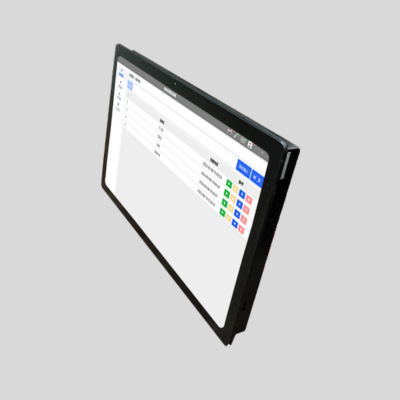
KURAN KR002-H01 supervisory controller displaying the tightening program management interface
Tightening Process Management
Programs Fastening Points Result Records
Match the Controller to Your Process

When Should You Choose the KR002-H01?

Consider the KR002-H01 when your assembly process needs product-specific visual guidance, barcode-based program selection, or searchable tightening records. The following requirements can help you decide what to include in your workstation configuration.

Product Changeover

Different Products Need Different Programs

Your workstation handles multiple product variants with different fastening-point layouts or process requirements. The H01 supports product-specific program setup and barcode-based program selection.

Typical requirement Associate product identification with the appropriate tightening program during model changes.
Operator Guidance

Operators Need Clear Fastening-Point Prompts

Your product has several fastening positions that can be difficult to distinguish. Imported product images and fastening-point indicators give operators a visual reference for the configured assembly task.

Typical requirement Show fastening locations on a product image so operators can identify the intended working point.
Quality Review

Your Quality Team Needs Tightening Records

You need to review previous tightening tasks and individual fastening-point results. The H01 provides historical record queries; available torque, angle, curve, and result data depend on the connected tightening equipment and interface.

Typical requirement Find task records within a selected time range and inspect the available details for each fastening point.
Device Coordination

Your Process Uses Several Connected Devices

Your workstation combines a sensor-equipped torque arm, tightening equipment, and devices such as a socket selector, barcode scanner, or status light. The required device combination can be reviewed for your application.

Typical requirement Define the role, interface, and expected response of each device within the configured assembly process.

One workstation may combine several of these needs. Share your product variants, tool and torque arm models, and required production records so KURAN can review the appropriate software and device configuration.

Inside the H01 Software

Visual Program Setup and Fastening-Point Guidance

Build tightening programs around your products and define fastening locations using product images and taught positions. The KR002-H01 interface brings program management, point setup, and equipment communication status into the workstation configuration process.

Program Management

Build Programs Around Your Products

Create and organize programs for different products or assembly tasks. Access program operations from the list and review the communication status of the connected tightening tool and torque arm.

  • Create and Organize Programs Add product-specific programs and access them from the program management list.
  • Access Program Operations Run or edit a program, enter point teaching, or remove a program through the available action controls.
  • Check Equipment Communication View tool and torque arm connection indicators alongside the available arm position information.
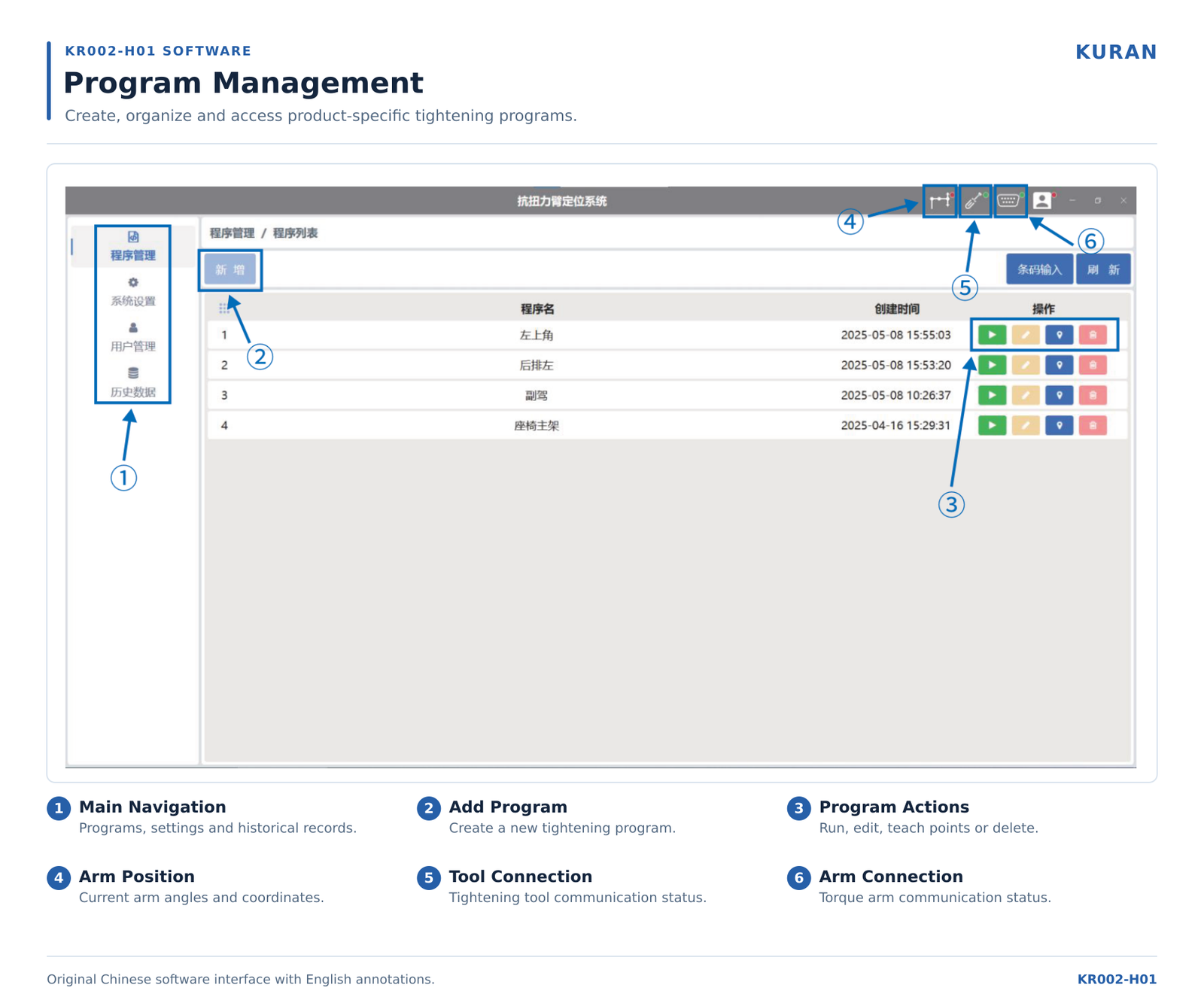
KURAN KR002-H01 program management interface with English feature annotations

Program management interface with numbered English explanations of the main controls and status indicators.

View Full-Size Image
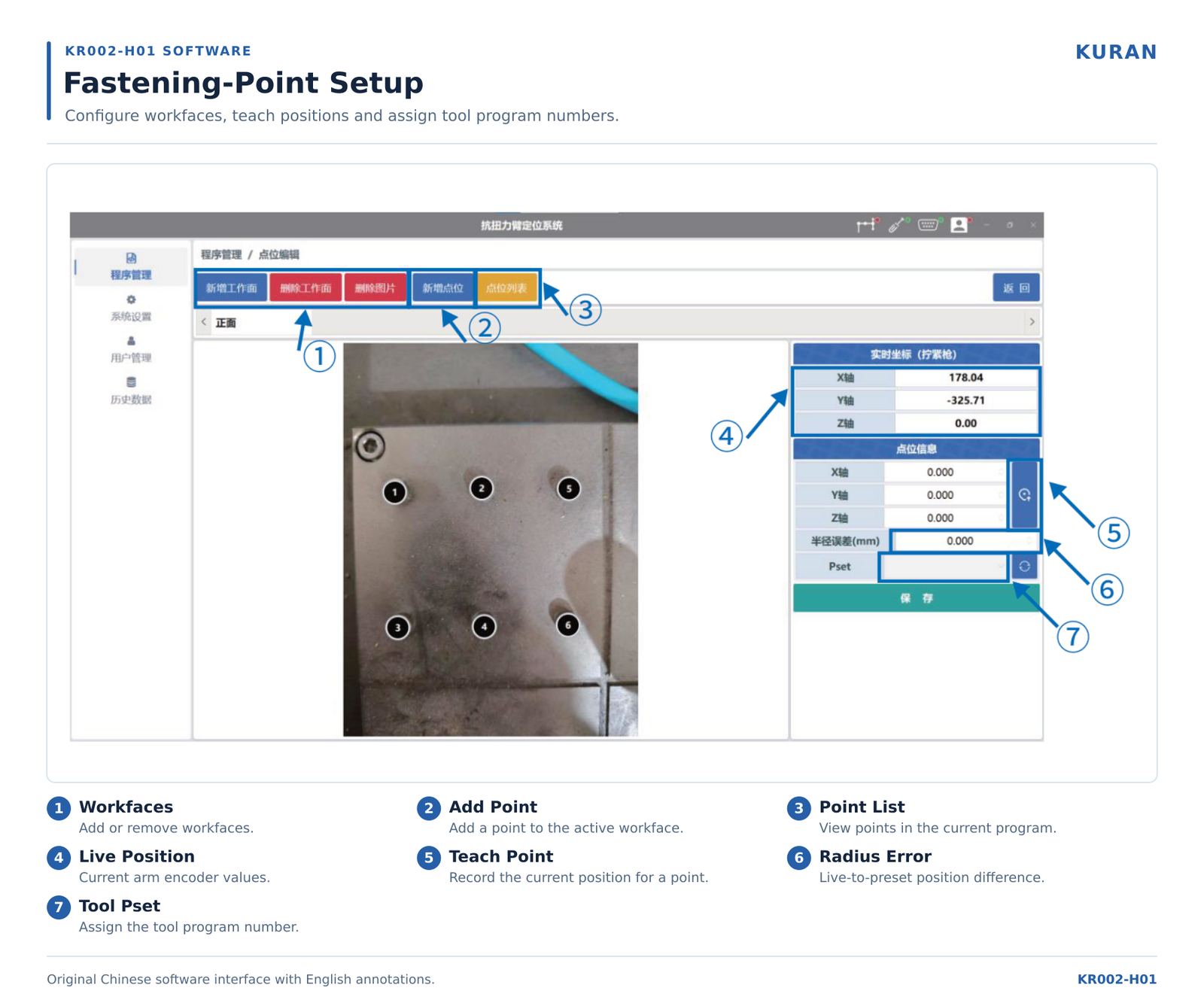
KURAN KR002-H01 fastening-point setup interface showing workfaces, position teaching and tool program assignment

Point setup interface showing the product image, numbered fastening locations, and position settings.

View Full-Size Image
Fastening-Point Setup

Define Where Each Operation Belongs

Import a product image, organize its working faces, and configure the fastening points for the program. Visual point markers provide a reference for the locations defined during setup.

  • Organize Product Views and Points Create workfaces and add fastening points to the relevant product view.
  • Teach Positions from the Torque Arm Use the current arm position values to record a reference position for the selected fastening point.
  • Assign the Tool Program Number Configure the point-specific Pset assignment for compatible tightening equipment as part of the workstation setup.

Validate the setup with your actual fixture and tool. Taught positions, point assignments, and equipment responses should be checked during commissioning, including any interrupted-cycle and rework requirements.

Program Selection for Product Variants

Barcode-Based Program Selection

Use barcode scanning to call the configured tightening program for a product or assembly task. For workstations handling different variants, this provides a way to link product identification with the required program.

  1. Identify

    Scan the Product Code

    Read the configured barcode using a compatible scanner. The code format and the information used for program selection should be defined for your production process.

  2. Select

    Call the Assigned Program

    Use the configured relationship between the scanned code and the program to call the corresponding tightening task. Program associations are established during project setup.

  3. Operate

    Follow the Selected Task

    Continue with the selected program and its configured product image and fastening-point guidance. Tool operation follows the interfaces and process logic agreed for the workstation.

Before Configuration

Define How Your Codes Select Programs

Share a sample barcode, the required program list, and your scanner information. These details help KURAN review how barcode-based selection should fit into your existing assembly workflow.

Barcode Content
Provide sample codes and explain which part identifies the product model or assembly task.
Program Association
Define which tightening program should be called for each product or code category.
Scanner Connection
Provide the scanner model and available interface information for compatibility review.

Include exception handling in the configuration review. Define the required response to unreadable or unrecognized codes, missing program associations, and scans made during an active task.

Tightening Data and Quality Review

Tightening Records and Historical Data Review

Review previous tightening tasks and inspect individual fastening-point details through the KR002-H01 history interface. With compatible equipment and configured data collection, the system can retain tightening information for quality review and process investigation.
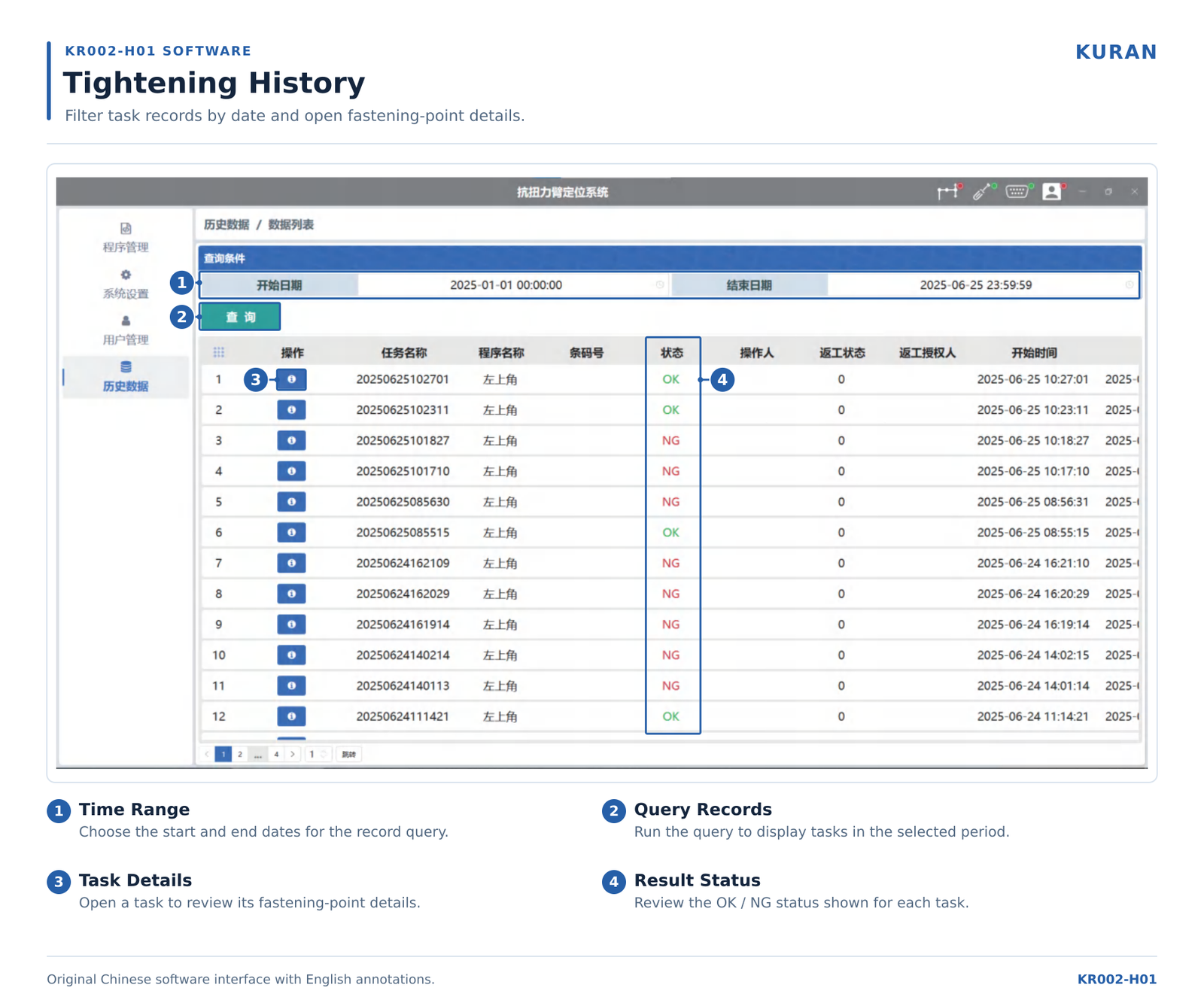
KURAN KR002-H01 tightening history interface showing date filters, task records and result review

Historical task list showing date filters, detail buttons, and OK / NG result status.

View Full-Size Image

Find the Task, Then Review the Details

Start with a time range to locate historical tasks. Review the listed results and open the relevant task to investigate its fastening-point records.

  1. Filter by Time Range

    Select the start and end dates, then query the task records for the period you want to review.

  2. Review Task Results

    Inspect task and program information alongside the displayed OK / NG status.

  3. Open Fastening-Point Details

    Use the task detail entry to review the available records for individual points in the program.

What Tightening Information Can Be Recorded?

The available record fields depend on the connected tool, controller interface, and project configuration. Confirm the required data fields before selecting the equipment and integration approach.

Data FieldInformation for ReviewWhat to Confirm
Fastening-Point Parameters Recorded parameters associated with the configured fastening point. Which point identifiers and position parameters your project needs to retain.
Tightening Torque The torque result provided by the connected tightening equipment. Whether the tool interface supplies the required torque value and unit.
Tightening Angle The angle result when available from the tightening equipment. Whether angle data is supported by the tool and communication interface.
Tightening Curves Curve data made available by compatible tightening equipment. The curve data available through the selected interface and the required record format.
Tightening Results Recorded results for reviewing task and fastening-point outcomes. The tool result signals and configured logic used to determine task status.

Swipe horizontally to view all table columns.

Define your record requirements before configuration. Share the data fields you need, expected retention period, and any product-identification or reporting requirements so KURAN can review the appropriate implementation.

Configure Your Assembly Workstation

Connected Devices and System Configuration

The KR002-H01 can be configured with torque arms, tightening equipment, and supporting workstation devices. The appropriate combination depends on your assembly process, available interfaces, and required device responses.

Position Input

Sensor-Equipped Torque Arms

Connect a compatible torque reaction arm to provide the position information used for point teaching and configured position checks.

Information to Confirm Arm model, sensor type, communication interface, and required working positions.
Tightening Operations

Tightening Tools and Controllers

Integrate compatible tightening equipment for the required program interaction and result collection. Available torque, angle, and curve data depend on the tool interface.

Information to Confirm Tool and controller models, interface documentation, program-selection method, and available result data.
Socket Selection

Socket Selectors

Include a compatible socket selector when the assembly process needs to identify socket selection as part of the configured workstation logic.

Information to Confirm Selector model, socket positions, available signals, and the required response to a selection change.
Product Identification

Barcode Scanners

Use a compatible scanner to support barcode-based program selection. Define how the scanned information relates to the available product programs.

Information to Confirm Scanner model, connection interface, sample barcode content, and program associations.
Workstation Feedback

Stack Lights and Indicators

Provide visible workstation feedback through configured lights and indicators. Define which production or equipment conditions each indication should represent.

Information to Confirm Device signals, required indication states, and the conditions that trigger each state.
Process Accessories

Screw Feeders and Sensors

Review screw feeders, illuminated sensors, and other error-proofing devices when additional process inputs or device coordination are required.

Information to Confirm Device models, signal definitions, process timing, and required interlock conditions.

Review the Device Combination Before Configuration

Share your equipment list and interface documentation. KURAN can assess compatibility and identify any additional connection hardware or software configuration needed for the proposed workstation.

Check Device Compatibility
Controller Selection

KR002-H01 vs KR002-B01: Which Fits Your Process?

Start with the functions your workstation requires. Compare program capacity, operator guidance, and record requirements, then confirm the equipment interfaces needed for your application.

Selection Factor KR002-B01 Field Controller KR002-H01 Supervisory Controller
Main Selection Focus Workstation-level torque arm position control and configured device I/O. Visual tightening program management, fastening-point guidance, and historical record review.
Program and Point Capacity Up to 10 programs, with up to 30 fastening points per program. Program and point requirements are reviewed against the proposed project configuration.
Operator Interface A 7-inch touchscreen for the controller's workstation functions. Program management and point editing with product images and fastening-point indicators.
Barcode Program Selection Confirm the required program-calling method for the intended configuration. Supports barcode-based program calling with the required scanner and program associations configured.
Production Records Confirm the required feedback and record functions for the proposed workstation. Historical task queries and point-level record review. Available torque, angle, and curve data depend on compatible equipment.
Information Needed for Selection Fastening-point count, program requirements, torque arm sensor interface, and tool I/O. Product variants, visual guidance requirements, barcode workflow, required records, and connected-device interfaces.

Swipe horizontally to compare both controllers.

Workstation Position Control

Start by Reviewing the B01

If your main requirement is torque arm position control at an individual workstation and your task fits its program capacity, review the KR002-B01 Field Controller and confirm the required tool and device interfaces.

Visual Guidance and Data Review

Consider the H01 for Broader Process Requirements

Consider the KR002-H01 when you need product-image guidance, barcode-based program selection, or historical tightening records. Define these requirements alongside the equipment interfaces during configuration.

Select around the complete assembly process. Share your required functions and existing equipment so KURAN can review the appropriate controller configuration and connection requirements.

KR002-H01 Frequently Asked Questions

Find answers about visual program setup, barcode selection, tightening records, and equipment compatibility.

How Does the KR002-H01 Differ from the KR002-B01?

The KR002-H01 focuses on visual program management, product-image guidance, fastening-point setup, barcode-based program selection, and historical tightening record review. The KR002-B01 Field Controller focuses on workstation-level torque arm position control and configured device I/O.

Select the configuration around your required functions, program capacity, connected equipment, and data requirements.

How Many Programs and Fastening Points Can the H01 Manage?

The H01 supports flexible configuration of tightening programs and fastening points. Practical capacity should be confirmed for the proposed hardware and software configuration.

Share the number of product variants, programs, workfaces, and points per program so KURAN can review the required capacity before configuration.

Can I Import Product Images and Teach Fastening Positions?

Yes. Product images can be used to organize workfaces and display fastening-point markers. With a compatible sensor-equipped torque arm, the current arm position values can be recorded as references for configured points.

Point positions and required equipment responses should be verified using the actual workpiece, fixture, and tightening tool during commissioning.

Can Barcode Scanning Select the Tightening Program?

Yes. The H01 supports barcode-based program calling with a compatible scanner and configured program associations. Provide sample codes, scanner interface information, and the required program relationship for each product or task.

The required responses to unreadable codes, unknown codes, and scans during an active task should also be defined during configuration.

What Tightening Data Can Be Recorded and Reviewed?

Depending on the connected equipment and interface, records can include fastening-point parameters, torque, angle, tightening curves, and results. The history interface supports time-range queries and access to individual task details.

Confirm the required fields, retention period, and any product-identification requirements during the project review. Available data depends on what the tightening equipment can provide.

Can the H01 Work with My Existing Tightening Equipment?

Compatibility depends on the tool and controller models, available interfaces, and required control and data functions. Share the equipment documentation so KURAN can review program interaction, result collection, and any additional connection requirements.

For an existing station, see our guide to retrofitting tool position control for the equipment details to prepare.

Which Supporting Devices Can Be Included?

Project configurations can include compatible sensor-equipped torque arms , tightening equipment, barcode scanners, socket selectors, stack lights, screw feeders, and other error-proofing devices .

The interface, signal definitions, and required process response of each device should be reviewed before confirming the configuration.

What Information Is Needed for a Configuration Review?

Prepare your product variants, fastening-point counts, tool and controller models, torque arm sensor details, and available interface documentation. Include any barcode workflow, peripheral devices, and required production records.

Product images, workstation photos, and layout drawings also help explain the intended operator guidance, fixture arrangement, and installation requirements.

Discuss Your KR002-H01 Configuration

Share your product variants, tightening equipment, barcode workflow, and required production records. KURAN will review your visual guidance, program management, and device integration requirements to help define a suitable H01 configuration.

KuRan Form
Scroll to Top

Contact KuRan’s engineers directly for comprehensive tightening solutions.

KuRan Form