
KR010 Gantry-Type Torque Reaction Arm
Move your tightening tool smoothly between fastening points across large workpieces or multiple fixtures. KURAN’s KR010 combines gantry rail travel, tool weight balancing and torque reaction support, with rail layout and working travel configured around your workstation. Optional XYZ position detection supports position monitoring when integrated with a compatible control system.
- Wide-Area Coverage
- Custom Rail Layout & Travel
- Low-Resistance Tool Movement
- Optional XYZ Position Detection
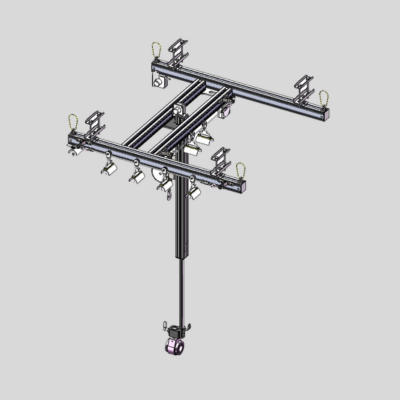
Is KR010 Right for Your Workstation?
If your tightening tool needs to move across a large workpiece or between fixture positions, KR010 provides a gantry-based support option configured around your fastening layout.
Widely Distributed Fastening Points
Bring the tightening tool to fastening points spread across a broad working area. Gantry rail travel helps cover positions beyond the local reach of the tool-support assembly.
Large Workpiece Assembly
Configure horizontal travel and vertical stroke around the workpiece dimensions, fastening-point locations and tool approach needed for large-component assembly.
Multiple Fixture Positions
Where several fixtures share one assembly area, evaluate a gantry layout that brings the supported tool to each position while maintaining access and a clear movement path.
Frequent Tool Repositioning
Support repeated movement between tightening points. Tool weight balancing and low-resistance travel help reduce the effort of holding and repositioning the tool.
How the KR010 Gantry System Works
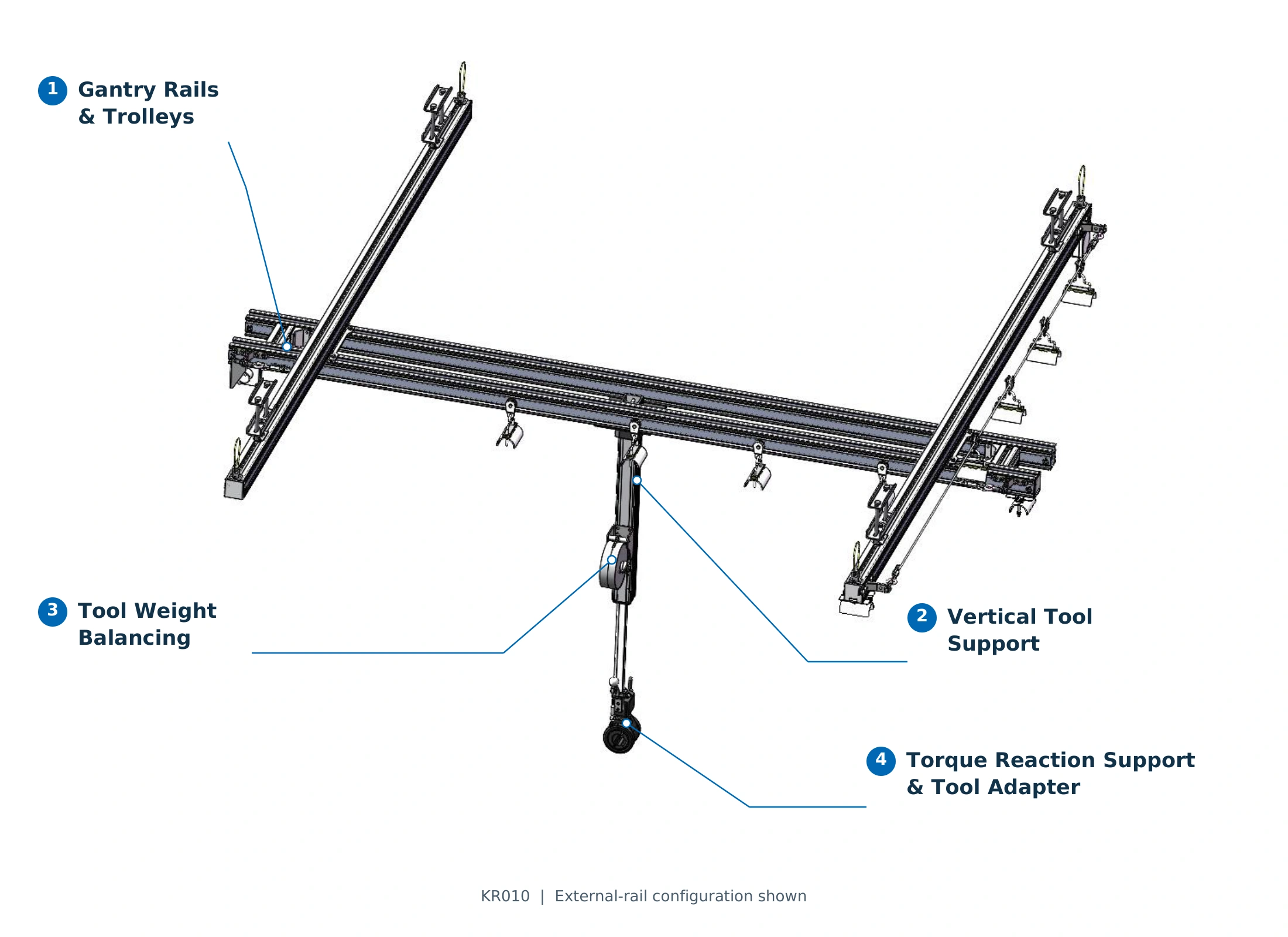
Horizontal rail travel brings the tool to the working area, while vertical movement helps align it with the fastening point. Weight balancing and torque reaction support assist the operator throughout the tightening process.
-
1
Gantry Rails & Trolleys
The rail-and-trolley system provides X/Y movement, bringing the tool-support assembly to different positions within the configured working area.
-
2
Vertical Tool Support
The lifting assembly allows the tool to move up and down. Vertical stroke and tube length are configured to suit fastening height, tool dimensions and available clearance.
-
3
Tool Weight Balancing
A balancing component matched to the supported load helps carry the tool weight, reducing the effort required to hold, raise and lower the tool during repeated operations.
-
4
Torque Reaction Support & Tool Adapter
The adapter connects the tightening tool to the arm. Reaction torque passes through the adapter and torque-support structure into the gantry system, with the interface selected for the tool and tightening orientation.
See KR010 in Action
Watch the KR010 gantry torque reaction arm in operation, then share your workstation layout and tool requirements for a configuration review.
KR010 Operation Video 1
Watch on YouTubeKR010 Operation Video 2
Watch on YouTubeChoose Your KR010 Rail Layout
Compare external and internal rail arrangements to find a starting point for your workstation. The final layout is configured around required travel, installation space, tool load and tightening orientation.
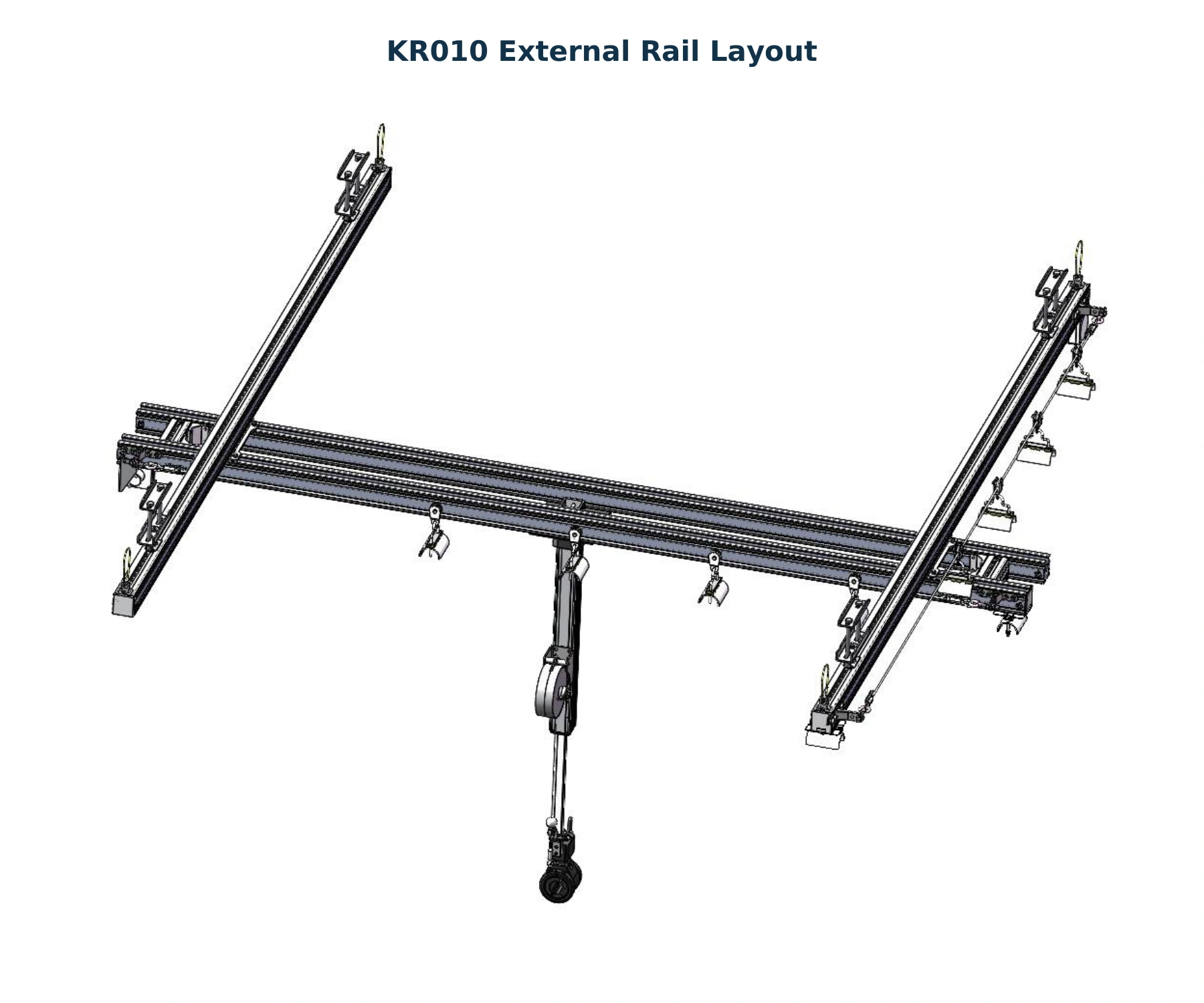
External Rail Layout
A starting point for larger working areas and longer travel requirements. The external rail arrangement brings the tool-support assembly across the configured fastening zone.
- Typical Workstation Fit
- Large workpieces, widely distributed fastening points or multiple fixture positions within one assembly area.
- Installation Considerations
- Confirm rail support locations, required X/Y travel and clearance along the complete tool movement path.
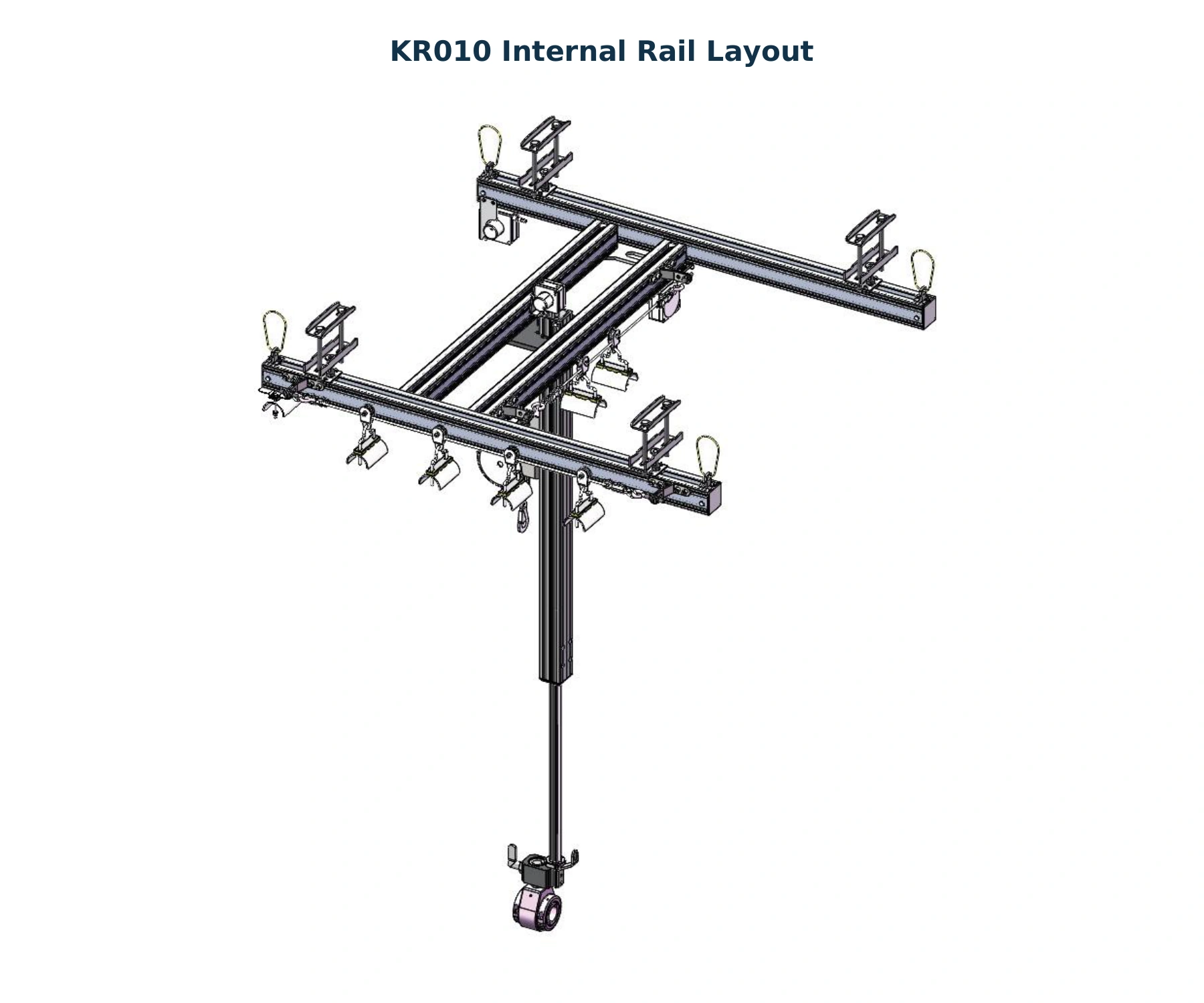
Internal Rail Layout
A starting point for compact workstations with shorter travel requirements. The internal rail arrangement keeps tool movement within a more closely grouped workstation layout.
- Typical Workstation Fit
- Compact assembly cells or fastening points grouped within a smaller working area.
- Installation Considerations
- Check available mounting space, effective travel, vertical clearance and access around fixtures.
Final layout selection also depends on reaction torque, tool weight, tightening direction and mounting strength. Share your workstation drawing and tool specifications for a configuration review.
Technical Specifications and Configuration Options
Compare the A100 and A200 configurations, then define the travel, vertical stroke and position-detection requirements for your workstation. Reaction torque capacity must be confirmed for the selected configuration and tightening direction.
| Parameter | A100 Configuration | A200 Configuration |
|---|---|---|
| Model Format | KR010-A100XY-H-L | KR010-A200XY-H-L |
| Catalog Default Load | 10 kg | 20 kg |
| Reaction Torque Rating | Confirm for configuration and tightening direction | Confirm for configuration and tightening direction |
| Interface Dimension W | 23 mm | 28 mm |
| Interface Dimension K | 20 mm | 20 mm |
| Interface Dimension ØA | 8.2 mm | 8.2 mm |
The load figures above are catalog default values. Balancer selection must account for the complete supported tool-and-accessory load. W, K and ØA identify dimensions in the tool-side interface drawing; check the selected adapter before installation.
Define Your Workstation Configuration
X/Y Horizontal Travel
Specify the effective travel required in each horizontal direction. The catalog lists customizable X and Y travel up to 6,000 mm per direction, subject to the final rail layout.
H — Vertical Stroke
Define the up-and-down movement needed to reach every fastening height, including clearance for the tool, socket and workpiece loading.
L — Square Tube Length
Configure the tube length around mounting height, tool dimensions and the operating position. Tube length and vertical stroke are separate selection parameters.
Optional Position Detection
Specify whether X, Y and Z position sensing is required. Sensor and controller selection depend on the positions to be monitored and the tightening-control requirements.
Understanding the Model Code
KR010-A100XY-H-L- KR010
- Gantry-type torque reaction arm series.
- A100 / A200
- Arm configuration designation.
- X / Y
- Customized horizontal travel in each direction.
- H
- Required vertical stroke, expressed in millimetres.
- L
- Square tube length, expressed in millimetres.
Working Travel and Installation Dimensions
Check horizontal coverage, vertical movement and tool-side connection dimensions before confirming your KR010 configuration. Effective travel and overall rail length must be considered separately.
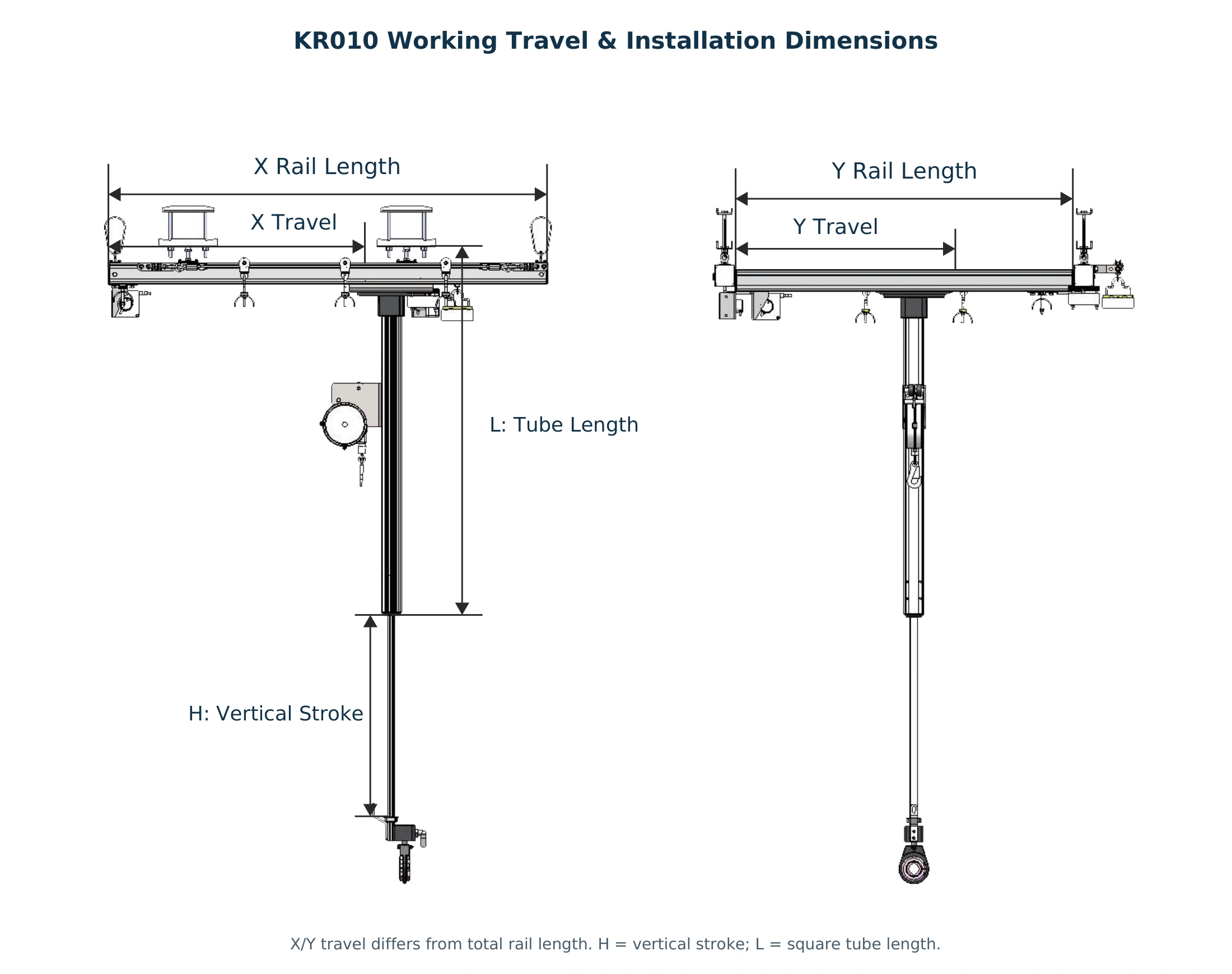
Confirm Your Working Envelope
- X / Y — Horizontal Travel
- Define the effective movement needed to reach all fastening points. Total rail length includes space beyond the usable travel and must also fit the installation area.
- H — Vertical Stroke
- Specify the up-and-down movement required for different fastening heights, tool approach and clearance during workpiece loading or removal.
- L — Square Tube Length
- Match the tube length to the mounting height and working position. Tube length and vertical stroke are separate dimensions and should be checked together.
Include tool and socket dimensions when checking reach. Verify the complete movement path around fixtures, guards and adjacent equipment.
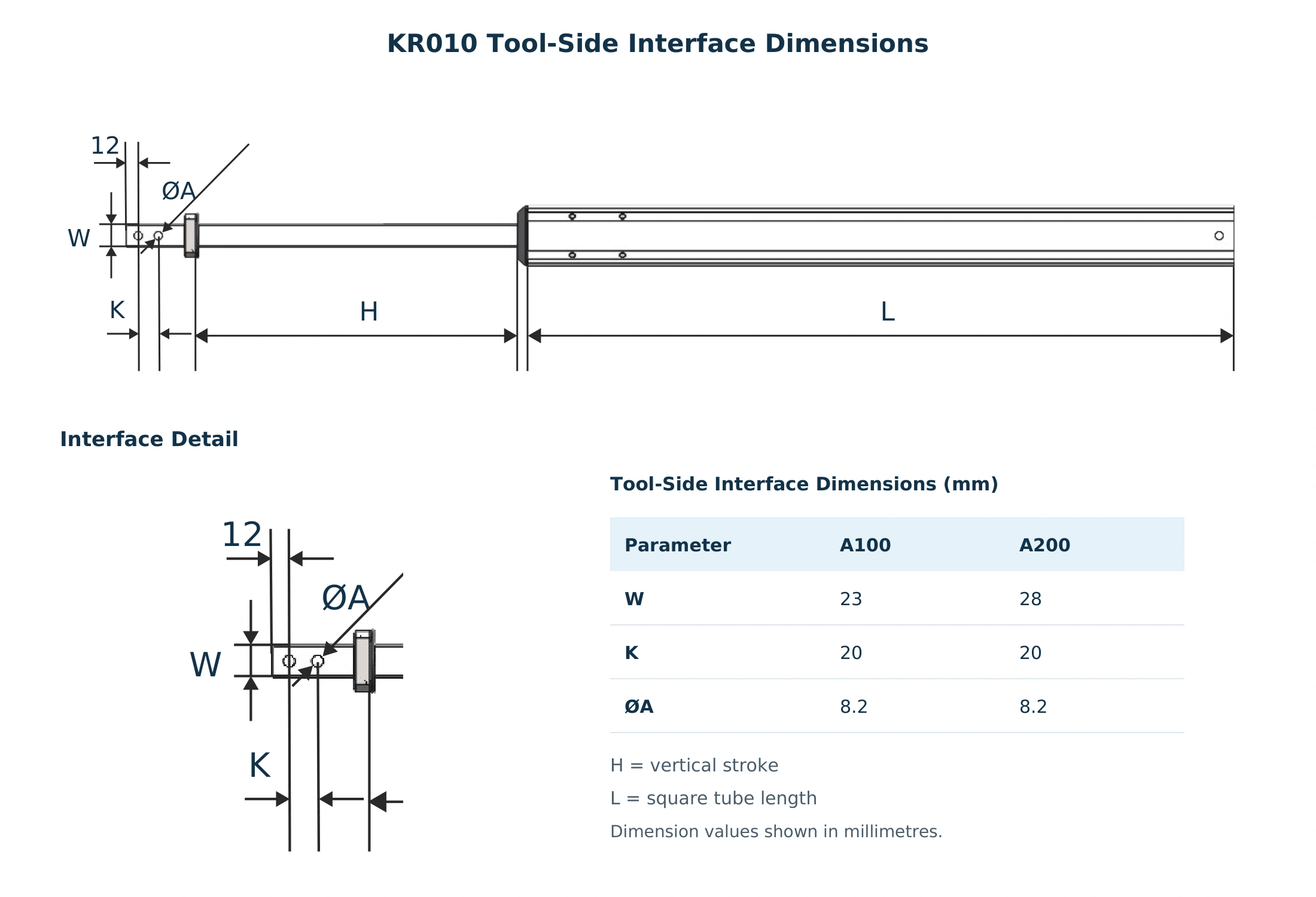
Check the Tool-Side Connection
Use the interface detail and A100/A200 dimension reference to check the mechanical connection before selecting the tool adapter.
- W / K — Interface Dimensions
- Match the dimensions identified in the drawing to the connection requirements of the selected adapter.
- ØA — Hole Diameter
- Check the hole diameter together with the interface geometry and mounting hardware.
- Tool and Adapter Requirements
- Provide the tool model, mounting dimensions, weight and tightening orientation so the complete connection can be reviewed.
Optional Position Detection and Tightening Control
Add position sensing where your process requires tool-location verification. With suitable sensors, a compatible controller and tool integration, KR010 can support position-based verification and controlled tightening sequences.
X/Y/Z Position Detection
Sensors can be selected for the required horizontal and vertical axes. The sensing configuration is matched to the rail layout, movement range and positions your process needs to monitor.
Position-Based Verification
A compatible controller compares the detected position with a configured target window. This helps verify whether the tool has reached the intended position before the next process step.
Tightening Sequence Control
Where the tool interface supports it, the control system can coordinate position checks with a defined tightening sequence and tool-enable logic for the current operation.
Application-Based Configuration
Define fastening-point spacing, acceptable position tolerance, tool communication and sequence requirements. These details guide sensor and controller selection for the workstation.
How a Position-Controlled Setup Works
-
1
Mechanical Support
The gantry system supports and guides the tightening tool.
-
2
Position Detection
Selected sensors report position signals to the controller.
-
3
Controller Verification
The controller checks the target position and current step.
-
4
Tightening Execution
The integrated tool operates according to the configured logic.
Position sensing is optional. Position verification, sequence control and tool-enable functions require the corresponding sensors, controller configuration and compatible tool interface.
Tool Compatibility and System Integration
Match KR010 to your tightening tool by checking the connection, supported load, operating direction and cable routing. Each component is selected around the complete tool setup and its movement through the workstation.
Tool Adapter Matching
Select or customize a KR005 tool adapter around the tool body, mounting dimensions and required tightening direction. Confirm the connection geometry and access to the tool controls before finalizing the interface.
Load and Balancer Selection
Include the tool, socket, adapter and other supported accessories when assessing load. Match the balancing component to the complete assembly and the vertical movement required during operation.
Tightening Orientation
Define the tool approach and operating direction at each fastening point. Review mounting orientation, any direction-changing adapter and the reaction torque rating for the selected arrangement.
Cable and Hose Management
Plan cable trolleys and routing around the full tool movement path. Check cable and hose length, bending allowance and clearance to reduce pulling, snagging or interference during travel.
What to Provide for a Tool Compatibility Review
Share the following details together with tool photos or drawings. This helps KURAN review the adapter, balancing component and operating arrangement for your KR010 workstation.
- Tool Model
- Maximum Configured Torque
- Complete Tool Assembly Weight
- Mounting Dimensions
- Tightening Direction
Frequently Asked Questions
Find answers to common questions about KR010 rail layouts, working travel, tool compatibility, optional position detection and installation.
KR010 is a gantry-type support option for tightening tools that need to move across a broad assembly area. Typical applications include large workpieces, widely distributed fastening points and multiple fixture positions.
Suitability depends on the required travel, complete supported load, reaction torque, tightening direction and available mounting structure.
An external rail layout can be evaluated for broader working areas and longer travel requirements. An internal rail layout can be evaluated for compact workstations with shorter travel requirements.
Final selection also considers tool load, reaction torque, mounting locations and clearance along the complete movement path. Workstation drawings help identify the suitable arrangement.
Yes. X/Y horizontal travel, H vertical stroke and L square tube length can be configured around the workstation. Provide the fastening-point layout, mounting height, tool dimensions and required operating clearance.
Effective travel differs from total rail length. Both dimensions must be checked to ensure coverage and installation fit.
Reaction torque capacity must be confirmed for the selected arm configuration, tightening direction, adapter and mounting arrangement. Selection should account for the tool’s maximum configured torque and the operating positions used throughout the workstation.
The arm carries reaction torque; the tightening tool and its controller remain responsible for applying and controlling the tightening output.
Compatibility can be reviewed using the tool model, body dimensions, mounting interface, torque requirement and operating direction. A suitable KR005 adapter can be selected or customized for the connection.
Include the socket, adapter and other supported accessories when reporting weight. Position-based tool control also requires a compatible communication or enable interface.
Position detection is optional. Sensors can be selected for the X, Y and Z axes according to the movement and positions that need to be monitored.
Position verification, tightening sequence control and tool-enable functions require the corresponding sensors, controller configuration and compatible tool interface. Specify these requirements during the configuration review.
Provide the tool model, maximum configured torque, complete supported weight, mounting dimensions and tightening direction, together with the required X/Y travel, H vertical stroke and available installation height.
Workstation photos, drawings and a fastening-point layout help clarify coverage and clearance. Also specify whether position detection, sequence control or tool-enable integration is required.
Configure Your KR010 Workstation
Share your tool model, maximum configured torque, total supported weight and fastening-point layout, together with required X/Y travel, vertical stroke and available mounting space. KURAN will help review your rail layout, tool adapter and optional position detection. Send the details you have to get started.