
A multi-point tightening workstation for engine assembly should connect every required fastener to an approved process, a reachable tool position, and an identifiable result. Start with the engine variant and joint instructions, then plan the fixture, tool support, sequence, cycle time, exception handling, and data exchange around those requirements.
This guide focuses on manual and assisted production workstations for engine covers, brackets, and other multi-fastener subassemblies. It helps manufacturing engineers and equipment buyers prepare a specification before selecting a torque reaction arm or controller. The planning tables and timing example are proposed engineering tools, not engine-specific tightening instructions. Actual torque values, pass order, acceptance limits, and fastener reuse rules must come from the approved product process.
Define the Engine Assembly Task and Its Boundaries
Begin with a clear station boundary. State which components arrive assembled, which fastening operations belong to this station, and what condition permits the engine or subassembly to leave. Include upstream tasks that affect readiness, such as fastener insertion, component seating, gasket placement, or sealant application. The workstation cannot resolve an undefined incoming condition through tightening controls alone.
List every engine variant and identify which points are mandatory, optional, or absent. Similar-looking covers can have different bolt patterns or accessories. Give the production system an explicit way to select the variant and an independent check where the process requires one. A scanner provides an identity input; whether that identity matches the physical part still depends on the identification and fixture arrangement.
Desoutter’s engine assembly application overview identifies short takt time, multiple screw types, and correct rework of NOK points as practical challenges. These are useful requirements to investigate, rather than performance assumptions for your installation.
Agree on the following inputs before asking a supplier to propose equipment.
| Planning input | What to record | Decision it supports |
| Product scope | Engine variants and incoming assembly condition | Recipe selection and fixture requirements |
| Fastening scope | Point IDs and required passes for each variant | Operation count and completion rules |
| Joint specification | Approved strategy, limits and instruction revision | Tool programs and acceptance criteria |
| Production demand | Target output and available production time | Takt and station capacity |
| Exception route | Hold, inspection, rework and release responsibilities | Recovery logic and staffing |
Freeze the task definition before the hardware list. If cylinder-head or bearing-cap operations are included, have the responsible engineering team approve their particular process and validate whether the proposed workstation architecture can execute it. A general workstation guide cannot supply those joint settings.
Build a Matrix of Fastening Points and Required Operations
Assign Point IDs and Pass IDs
Give each physical fastener a stable point ID. Then give each required operation its own identity. P03 during an initial pass and P03 during a final pass are separate tasks, even though the tool returns to the same location. This distinction prevents an initial-pass result from being mistaken for final completion.
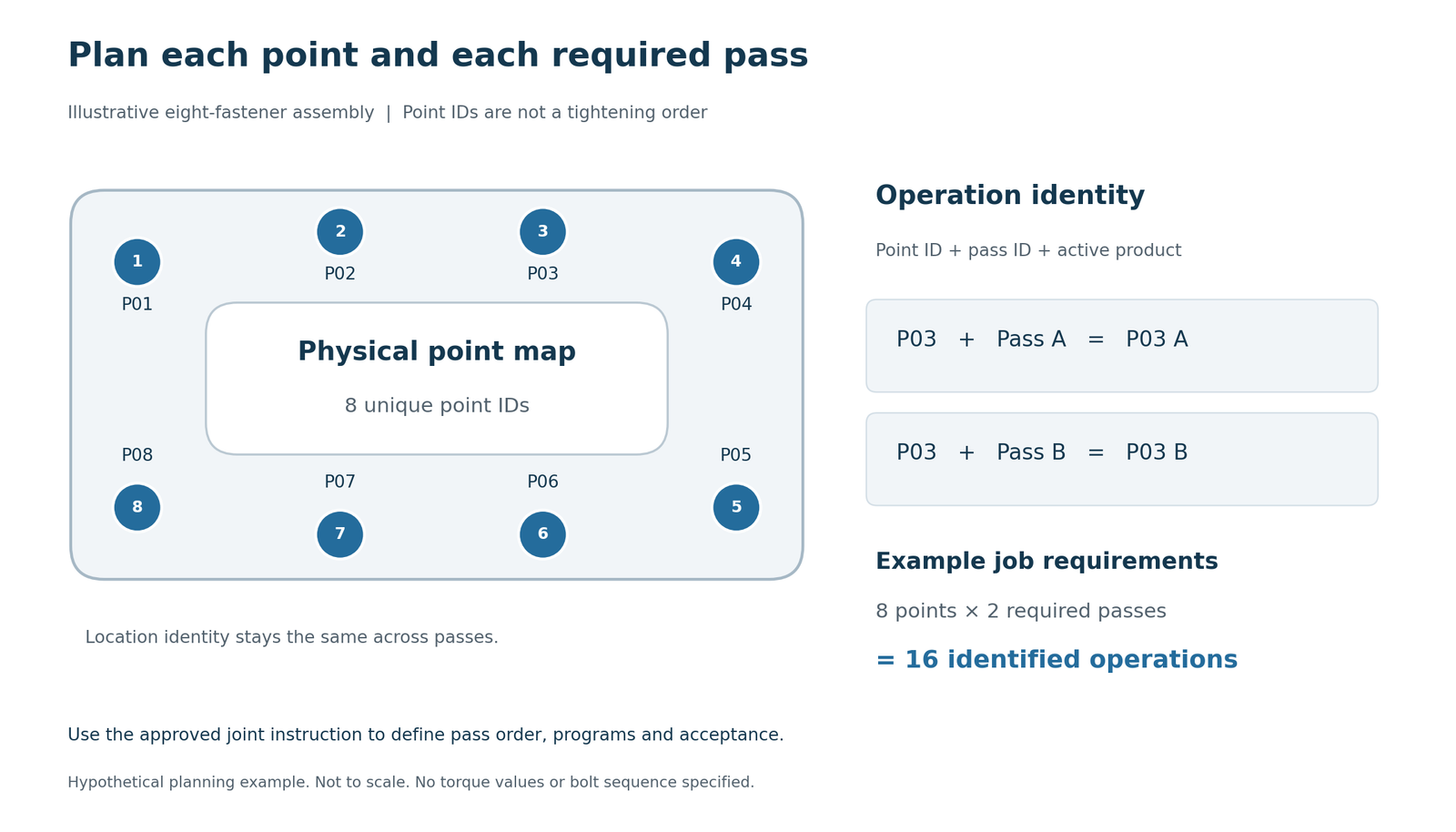
Prepare the matrix from the approved process instruction. Record the variant, point ID, pass ID, sequence position, program revision, tool, accessory, and acceptance rule. Add the fixture pose if the workpiece rotates. Use the same IDs in drawings, operator guidance, controller configuration, and stored results so commissioning does not depend on translating between unrelated naming systems.
Keep the point ID separate from sequence position. If an approved revision changes the order, P03 should still identify the same physical fastener. Record the revised sequence in the recipe. For a variant that omits P03, mark it as not required in that recipe rather than renumbering the remaining points.
The following example illustrates the record structure. It contains no production torque settings or recommended bolt order.
| Operation ID | Physical point | Pass | Program reference | Completion requirement |
| P01 A | P01 | Initial pass | Approved program A | Accepted result for P01 in pass A |
| P01 B | P01 | Final pass | Approved program B | Accepted final result after required prerequisites |
| P02 A | P02 | Initial pass | Approved program A | Accepted result for P02 in pass A |
| P02 B | P02 | Final pass | Approved program B | Accepted final result after required prerequisites |
Define Completion for Every Required Operation
Extend the matrix to every mandatory point and pass. State whether a pass must finish across the entire joint before another begins, whether some independent tasks may occur in any order, and how optional points are excluded for a particular variant. Those rules come from the process specification.
Separate the required operation from its attempts. A retry at P03 B remains another attempt for that operation, with its own result and disposition. It does not add a seventeenth required task or erase the first attempt. Define how an authorized correction affects completion when earlier work must be repeated.
Count accepted operations against the required matrix. A total of sixteen OK signals cannot prove that eight bolts each received two different required passes. Completion needs the correct association between product, point, pass, and result.
This matrix becomes the connection between the mechanical layout and the controller job definition. It also provides a practical change-control record when an engine variant or instruction revision changes.
Map the Fixture and Check Access to Every Fastener
Create a coordinate reference on the fixture and document each point’s location, approach axis, insertion depth, and permitted fixture pose. Include the engine envelope, clamps, locating features, nearby equipment, and the route used to load and unload the assembly. Capture the actual socket, extension, and adapter geometry, not just the tool body.
For a detailed geometric worksheet, use KURAN’s guide to mapping fastening points. Here, the goal is to connect that map to the complete production task: which point is accessed, in which fixture pose, with which tool configuration, during which pass.
Check the full movement between points. A tool can reach two locations separately yet collide with a clamp while moving between them. Include the parked tool position, socket-change location, scanner reach, cable path, and emergency access. If the engine rotates, document how the station verifies the required fixture pose before the next operation is enabled.
Can the fixture move after the fastening points are taught? If it can, define how the coordinate reference is restored or transformed. An indexed fixture needs a repeatable pose and a confirmed pose signal where that signal is part of the process. A freely repositioned workpiece may require an additional referencing method rather than a fixed point map.
For position verification, test neighboring points under actual variation in fixture location, tool deflection, adapter geometry, and operator approach. Where XY recognition cannot distinguish required locations at different heights, assess Z measurement or another independent condition. Three coordinate axes alone do not verify tool orientation or socket engagement.
Use a physical mock-up or application trial before freezing the layout. Ask operators to perform the entire job with the intended accessories. Record unreachable points and awkward transitions as design issues, rather than relying on nominal arm reach to close them.
Select the Tightening Tool and Torque Reaction Support Together
Match the Tool to the Approved Joint Process
Choose the tool from the approved joint strategy and operating range. Confirm required torque and angle functions, fastening speed, result detail, access geometry, duty requirements, and the available controller interfaces. An acceptable nominal torque range does not establish suitability for every joint or production cycle.
Atlas Copco’s Pocket Guide to Tightening Technique explains that lubrication changes the relationship between applied torque and clamping force, and that joint stiffness affects tightening behavior. Preserve the specified fastener and surface conditions when validating programs; a generic torque table is insufficient for an engine joint.
Prepare a tool capability sheet for each joint family. Link the approved program to the tool model, controller version, accessory, and required result fields. During the trial, demonstrate program selection and acknowledgment as well as tightening performance. Resolve any missing interface function before using that tool in the station design.
Verify Reaction Support and Tool Geometry
Evaluate reaction support with the tool installed. Record the combined mass and center of gravity of the tool, socket, extension, and adapter, together with the maximum applicable reaction torque and working orientation. Verify the mounting structure, usable movement, balance, and required clearances with the supplier. Cable and hose routing must allow the actual production motions.
KURAN’s torque reaction arm range provides structural options for fixed stations, high-torque work, longer reach, and wide work areas. A dual-axis arrangement may be a starting point for several points around one fixture; a gantry arrangement may suit a broader working envelope. These are layout starting points, not a model recommendation for an unspecified engine.
Specify whether the arm needs mechanical support only or also position sensing. Torque reaction support, tool balancing, and location verification are different functions; confirm each required function in the proposed configuration.
Check the deepest approach, the longest extension, and the most obstructed point with the complete assembly installed. Confirm that the socket can enter and withdraw without unintended contact, and that the operator can reach the trigger throughout the motion. Include clearance for accessory replacement and routine tool servicing in the layout review.
Include the tool-change procedure in the design. A replacement tool or a longer socket may alter the effective location of the tool tip and the point teaching. State what must be checked before production resumes. The same review should cover mounting changes and fixture repairs that affect the coordinate reference.
Define How the Station Enables and Accepts Each Operation
Write the operation-enable conditions before programming the controller. A proposed pattern is to require an identified product, a valid variant recipe, confirmed fixture readiness, the permitted point and pass, the correct accessory, and an acknowledged tool program before enabling a tightening. Add other conditions only when they have a defined process purpose.
Atlas Copco’s Industrial Location Guidance documentation describes location-dependent tool enable, program selection, and sequence guidance. It supports the principle of connecting location with the authorized operation. It does not establish compatibility or positioning performance for another supplier’s configuration.
Use a defined transaction for the active operation. Bind the returned result to its product, point, pass, program, and attempt identifier before updating completion. Document how position is checked during the operation and what happens if the tool leaves the permitted region. The timing and persistence of that check depend on the selected equipment and validated process.
| Condition under test | Proposed station response | Evidence to verify |
| Wrong point or fixture pose | Withhold the applicable operation enable | Point and pose status with enable output |
| Wrong program or accessory | Prevent the operation from starting | Program acknowledgment and accessory input |
| Required operation accepted | Mark only that operation complete | Matching product, point, pass and result |
| Duplicate or late result | Reconcile without adding an extra completion | Event identity and prior operation state |
| Any mandatory operation unresolved | Withhold normal product release | Required-operation matrix and hold status |
These responses are specification proposals to implement and test. A green indicator or a general OK input does not, by itself, provide all of this evidence.
Use KURAN’s KR002 control-system overview to discuss field control and supervisory requirements. Ask the supplier to confirm which layer owns each state, which interfaces carry it, and what information the compatible tightening tool can actually provide.
Plan Accessory Changes and Mixed Engine Variants
Build a variant table that specifies the required point set, tool programs, sockets, fixture configuration, and permitted work instructions. Validate the recipe against the physical assembly and the incoming identity process. If a variant omits a point, remove that operation through the authorized recipe rather than asking the operator to skip an unexplained step.
Where the job uses several sockets or bits, decide how selection is verified. A socket selector can provide an accessory-selection condition, but its signal does not independently establish the correct engine variant or fastener location. Confirm how an accessory is associated with the tool and what happens if it is changed after selection.
KURAN’s KR004 poka-yoke devices offer options for accessory selection, program selection, locking, and status indication. Match each device to a defined error condition. A manual program selector still needs an appropriate verification rule when the process requires automatic prevention of a wrong program.
Test a variant change before the first tightening, after a partially completed job, and during a held operation. The design should preserve the identity and outstanding work of a partially assembled product. A recipe change must not silently clear its incomplete tasks.
Keep instructions readable at the point of use. Show the active engine variant, point, pass, accessory, and next action with a layout operators can interpret while moving the tool. Check the guidance on the actual screen and workstation, including visibility when the arm or engine blocks part of the display.
Calculate Cycle Time From the Complete Work Sequence
Include Every Task in the Cycle-Time Estimate
Calculate takt time as available production time divided by required output for the same period. Then estimate station cycle time from all tasks that occupy the station. Include product identification, loading and clamping, every tightening pass, tool movement, accessory changes, checks, and unloading. Define which activities can overlap before subtracting any time.
For a sequential single-tool station, a useful planning expression is:
Station cycle time = fixed handling and identification time + total tightening time + total movement time + accessory and fixture changes + checks and release time.
Use consistent measurement boundaries, such as the station becoming available for an incoming unit through becoming available for the next unit. Separate tool running time from travel and handling to avoid double counting. Record the engine variant, operator, and accessory arrangement for each trial so slow transitions can be traced to their cause.
Calculate an Illustrative Eight-Fastener Cycle
The following hypothetical example assumes eight fasteners, two tool cycles per fastener, one operator, no overlapping tasks, and a 90-second takt. The durations are planning assumptions, not measured KURAN performance or engine process settings.
| Activity | Hypothetical assumption | Time per unit |
| Identify, load and clamp | Combined handling task | 12.0 s |
| Initial-pass tightenings | 8 cycles × 1.4 s | 11.2 s |
| Final-pass tightenings | 8 cycles × 2.2 s | 17.6 s |
| Move between operations | 15 moves × 1.0 s | 15.0 s |
| Change accessories | 1 change × 3.0 s | 3.0 s |
| Check, release and unload | Combined exit task | 8.0 s |
| Total estimated cycle | Sum of sequential tasks | 66.8 s |
Sixteen sequential operations create fifteen transitions between them. The example assigns initial tool positioning to the loading task and final tool parking to the exit task. Confirm those boundaries in the actual time study. If either motion is excluded from handling, add it explicitly rather than assuming the fifteen transitions cover it.
The estimated difference from takt is 90.0 − 66.8 = 23.2 seconds. This is preliminary timing headroom, not a validated allowance for downtime or rework. Station utilization, line losses, replenishment, operator variation, and the slowest engine variant need separate evaluation.
Measure repeated complete cycles during a trial. Review the spread of cycle times as well as the average. If capacity is insufficient, consider reducing unnecessary movement, improving access, moving preparation upstream, splitting tasks, or using a dedicated multi-spindle arrangement where the approved joint process permits it. Do not accelerate the tightening strategy solely to meet an unvalidated timing estimate.
Specify NOK Handling and Recovery Before Production
Define Product Holds and Authorized Rework
Define the response to a failed attempt, a missing result, and an interrupted job separately. NOK means the tool reported that its configured acceptance conditions were not met. A missing message leaves the station uncertain; it is not a tool-reported NOK or evidence of acceptance.
For an unresolved mandatory operation, specify the product hold, the operator message, the person authorized to act, and the permitted inspection or rework instruction. Include the physical handling route when an engine must leave the normal station for review. Keep outstanding work attached to the product identity throughout that transfer.
The recovery instruction should identify the affected point and pass, permitted action, authorization, and evidence required for release. Display the action the operator can take next. Where approval is required, define how it is recorded and how the station receives the disposition before normal production can resume.
Atlas Copco’s ToolsNet Rework overview describes querying results by product ID, guiding repair with selected tools and parameters, and returning repair data. Those functions illustrate why the exception path belongs in the workstation specification.
An alarm reset should not grant a fastening operation an accepted status. Define what acknowledgment does and which separate action authorizes recovery. Whether another tightening attempt, loosening, replacement, or inspection is allowed must follow the joint-specific instruction. Keep the original failure and later disposition available for review.
Use KURAN’s NOK and rework planning guide for the detailed failure-and-action matrix. In this overall station plan, also state whether approved rework occurs locally or at a separate station and how the main line receives its final disposition.
Plan Recovery After Missing Results or Interruptions
Test restart behavior with a partially completed product. Recover its last confirmed state and reconcile any uncertain attempt before enabling further work. Include disconnects, duplicate messages, power interruptions, and a delayed result arriving after recovery. Agree on the action when records cannot identify the completed operation unambiguously.
Include an interruption immediately after the tool finishes but before the station stores the result. This exposes whether recovery can reconcile the controller record with the unfinished transaction. Test a replay of the same result afterward: it should restore the correct operation state without accepting another point or increasing the completion count.
Define Traceability and the Responsibilities of Each Control Layer
Specify the Required Tightening Records
Agree on the record needed to reconstruct one engine’s fastening history. A proposed minimum includes product ID, variant, station, physical point, pass, program revision, tool ID, attempt ID, timestamp, measured result, acceptance status, and final disposition. Add accessory identity, approver identity, and trace references where the process requires them and the equipment supplies them.
Atlas Copco’s Power Focus Live Results documentation distinguishes individual tightening results from batch status and describes torque/time and torque/angle traces. Verify the fields exported through the selected interface; information visible on a tool screen may not all be available to the station or MES.
For example, the history for product ENG0001 at P03 B could contain a failed first attempt and an authorized second attempt. Retain both records and the release disposition. A quality reviewer should be able to connect them to the same required operation and instruction revision without treating them as two completed fasteners.
Assign Data Ownership and Communication Rules
Assign ownership explicitly. The tightening controller normally supplies the measured result. Station logic associates operations with the active job. The supervisory or manufacturing execution system can hold product history and production disposition, according to the agreed architecture. Avoid two systems independently deciding that a product is complete using different rules.
Specify the communication contract: program-selection acknowledgment, enable conditions, result-event identity, point and pass association, release acknowledgment, and error responses. If only discrete I/O is available, identify which data fields are unavailable and whether that limitation meets the customer’s requirements. Do not promise detailed traceability from a generic OK/NOK wire.
Define buffering, retry behavior, duplicate handling, clock alignment, backup, and the response to loss of the higher-level system. Agree on retention duration from the customer’s quality and contractual requirements rather than choosing an arbitrary universal period. During acceptance, retrieve one product’s records through the same method the quality team will use later.
Make the offline production rule explicit. If production may continue while the supervisory connection is unavailable, specify which local records support it, who authorizes it, and how stored results are reconciled later. If required records cannot be preserved, define the hold response. Demonstrate the selected rule during acceptance rather than assuming buffering is available.
Validate the Workstation Against Observable Acceptance Tests
Convert the planning matrix into factory and site acceptance tests. Set the pass criteria and responsible approvers before the trial. Use the production tool, representative engine variants, intended accessories, approved programs, and the actual integration arrangement.
| Acceptance scenario | What the trial should demonstrate | Record to retain |
| Extreme and obstructed points | All required approaches and movements are usable | Layout review and trial observations |
| Neighboring points and changed height | Required locations are distinguished under variation | Position test results and settings |
| Incorrect point, pass or accessory | The defined operation is prevented or contained | Input, enable and message evidence |
| Partial job and recipe change | Outstanding work remains tied to the original product | Operation-state and recipe records |
| NOK, disconnect and restart | Holds persist and uncertain results are reconciled | Recovery sequence and event history |
| Complete engine variant | All required tasks finish within agreed capacity criteria | Repeated cycle measurements |
| Product history retrieval | Results and dispositions can be reconstructed | Retrieved product record |
This table is an application-planning checklist, not a certification test protocol. Have the responsible teams define additional machine safety, structural, joint-validation, calibration, and customer-specific acceptance requirements for the installation.
Record baseline settings and instruction revisions after acceptance. Specify when revalidation is required, including a new engine variant, fixture movement, tool replacement, accessory geometry change, or controller update. Explain which checks operators can perform and which changes require engineering authorization.
The procurement deliverable should now contain a point-and-pass matrix, verified layout, control and data responsibilities, timing evidence, recovery instructions, and signed acceptance criteria. These documents make different equipment proposals comparable and give the commissioning team a defined job to prove.
Frequently Asked Questions
Does multi-point tightening mean several bolts must be tightened simultaneously?
No. Multi-point describes a task with several fastening locations. One tool can perform them sequentially, or a dedicated system can use several spindles. Select the arrangement from the approved joint process, access, production demand, and required flexibility. The example in this guide assumes sequential single-tool operation.
Can a torque reaction arm measure whether the joint is correctly tightened?
A mechanical reaction arm provides support. An arm equipped with suitable sensing can contribute location information. The tightening tool and its controller provide the configured tightening measurement and result; joint acceptance also follows the approved process. Specify and validate these functions separately.
Does every engine assembly station need torque and angle control?
Use the strategy approved for each joint. Atlas Copco’s tightening technique guide describes different tightening methods; it does not prescribe one universal program for engine assembly. Validate the tool’s control and monitoring functions against the actual specification.
Can an existing tightening tool be retained when the station is upgraded?
Yes, when its process capability, condition, and interfaces meet the new requirements. Confirm program selection, enable control, and available result data before designing around it. KURAN’s position-control retrofit guide provides a useful starting point for documenting existing equipment.
Prepare a Workstation Review With KURAN
Send KURAN the engine variants, approved point-and-pass matrix, fixture drawing or CAD, approach directions, tool and controller models, socket and adapter details, maximum applicable torque, combined supported weight, target takt, and required data interfaces. Include sample result records and the agreed NOK route if the station is being upgraded.
If measurements or instructions are still preliminary, identify them clearly so they can be verified before configuration. A short video of the current complete cycle can help explain movement, access, and handling constraints; pair it with drawings and timings rather than using video as a substitute for dimensions.
Request a workstation configuration review from KURAN to discuss torque reaction support, position verification, accessory selection, and control integration against the actual engine assembly task.